

هل ما زلت تدير طلبات المبيعات عبر محادثة على واتساب، وأداة منفصلة للفوترة، وجدول بيانات؟ لست وحدك.
يوجد الآن في المملكة العربية السعودية 1.7 مليون منشأة صغيرة ومتوسطة مسجلة، لكن تقرير التحول الرقمي لعام 2024 الصادر عن «منشآت» كشف عن فجوة كبيرة في تبني الحوسبة السحابية والأدوات الرقمية المتكاملة في هذا القطاع. فما زالت معظم الشركات الصغيرة والمتوسطة تدير المبيعات والمخزون والفوترة عبر أنظمة منفصلة لا تتواصل مع بعضها البعض.
وفي المملكة العربية السعودية، حيث تترتب على الامتثال لضريبة القيمة المضافة ولوائح الفوترة الإلكترونية الصادرة عن هيئة الزكاة والضريبة والجمارك (ZATCA) عقوبات مالية حقيقية، فإن هذا التشتت يشكل مخاطرة.
المشكلة الأساسية واضحة ومباشرة. فمعظم الشركات النامية تتجاوز قدرات أدواتها الحالية قبل أن تدرك ذلك. يستخدم أحد الفرق نظام إدارة علاقات العملاء (CRM)، بينما يُصدر فريق آخر الفواتير عبر Excel، ويقوم المستودع بإرسال التحديثات عبر الرسائل. والنتيجة هي أن أحدًا لا يمتلك صورة كاملة عن سير العمل.
في هذه المدونة، سنستعرض بالتفصيل ما الذي تفعله وحدة المبيعات والتوزيع في نظام ERP، وكيف تعمل بشكل متكامل من البداية إلى النهاية، وما الذي يجب على الشركات في المملكة العربية السعودية البحث عنه اليوم.
تدير وحدة المبيعات والتوزيع في نظام ERP جميع مراحل المعاملة التجارية. ويشمل ذلك إعداد عرض السعر وتأكيد أمر البيع، مرورًا بعمليات الشحن والتسليم من المستودع، وصولًا إلى إصدار فاتورة متوافقة مع ضريبة القيمة المضافة وتحصيل المدفوعات. كما تربط بين فريق المبيعات والمستودع والإدارة المالية ضمن نظام واحد متكامل، دون الحاجة إلى عمليات تسليم يدوية أو إدخال مكرر للبيانات.
نظام إدارة علاقات العملاء (CRM) مصمم لإدارة كل شيء قبل البيع: العملاء المحتملين، المتابعات، مراحل خط الأنابيب، وتاريخ تواصل العملاء. وهو يؤدي هذه الوظيفة بشكل جيد. لكن بمجرد تأكيد الصفقة ووصول أمر الشراء إلى مكتبك، لا يقدم CRM أي وظيفة إضافية.
فهو لا يمكنه تخصيص المخزون، ولا إصدار إشعار التسليم، ولا خصم المخزون من مستودع في جدة بينما ينتظر العميل في الرياض. والأهم بالنسبة للشركات السعودية، أنه غير مرئي لهيئة الزكاة والضريبة والجمارك (ZATCA). فالتزامك بالفوترة الإلكترونية يقع بالكامل على جانب نظام ERP.
إذا كنت تستخدم أداة فوترة مستقلة اليوم، فقد تتمكن من إصدار فاتورة، ولكن هل تستطيع هذه الأداة التحقق من توفر المنتج في المخزون قبل تأكيد الطلب؟ هل يمكنها إنشاء إشعار تسليم؟ وهل يمكنها إرسال الفاتورة إلى منصة «فاتورة» بشكل فوري وفي الوقت الفعلي؟
وحدة المبيعات في نظام ERP ليست مجرد أداة لإصدار الفواتير، بل هي محرك متكامل لإدارة المعاملات يربط بين المخزون وعمليات التسليم والحسابات المالية. وهنا تكمن القيمة الحقيقية.
الآن بعد أن تعرفت على ماهية هذه الوحدة، دعنا نستعرض بالتفصيل كيف يمكن لوحدة المبيعات في نظام ERP أن تدعم أعمالك وتُحسن كفاءتها.

تفقد الشركات الصغيرة والمتوسطة الوقت بسبب الأعمال اليدوية. تعمل وحدة المبيعات والتوزيع في نظام ERP على إزالة هذه العقبات، حيث تربط بين المبيعات والمخزون والتسليم والمالية في نظام واحد. فيما يلي أهم خمس قدرات تهم أكثر:
تفقد العديد من الشركات الصغيرة الطلبات لأنها لا تعرف حالة المخزون الفعلية. تحل وحدة المبيعات في ERP هذه المشكلة:
وبذلك يتوقف التخمين ويبدأ البيع بثقة.
في العديد من الشركات الصغيرة والمتوسطة، يتطلب معالجة الطلبات عدة خطوات يدوية، حيث ينتقل الفريق بالبيانات بين الأدوات وينتظر التحديثات. يقوم نظام ERP بإزالة هذه التأخيرات:
يتمكن فريقك من معالجة الطلبات بسرعة أكبر مع جهد يدوي أقل.
الأخطاء في التسعير تكلف المال، فالأسعار الخاطئة تقلل الهوامش أو تفقد الصفقات. تمنع وحدة المبيعات في ERP هذه الأخطاء:
تضمن التسعير الدقيق حماية الهوامش وبناء ثقة العملاء.
لا تستطيع العديد من الشركات النامية تلبية كل طلب في شحنة واحدة، حيث تكون نقص المخزون وتأخير الموردين أمرًا شائعًا. يدير نظام ERP هذه الحالات بسلاسة:
يتمكن فريقك من التعامل مع الطلبات المعقدة بدون ارتباك.
يرى العديد من أصحاب الأعمال النتائج فقط في نهاية الشهر، وعندها يكون الوقت قد فات لاتخاذ إجراءات. يوفر نظام ERP رؤية فورية:
تمكنك البيانات الفورية من اتخاذ قرارات أسرع وأفضل.
اقرأ أيضًا: وحدات ERP للإنشاءات التي تساعد الفرق السعودية على تقليل التأخيرات
فهم الوحدة هو الخطوة الأولى. أما الخطوة التالية فهي تعلم كيفية استخدامها في العمليات اليومية، بدءًا من إنشاء أمر البيع وصولًا إلى إرسال الفاتورة المتوافقة وتحصيل المدفوعات.

رسم توضيحي بديل
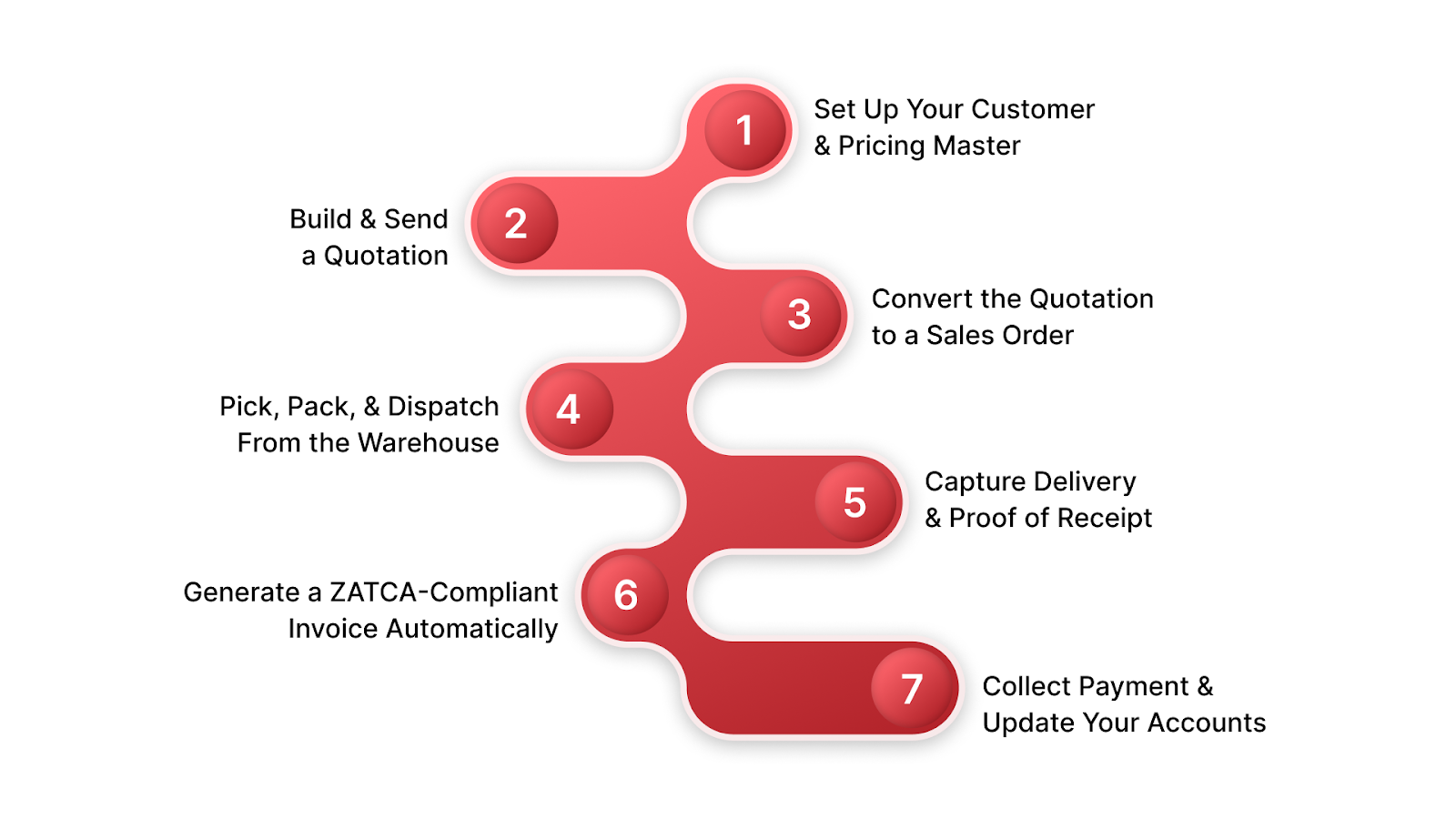
تحسين عملية المبيعات باستخدام وحدة المبيعات والتوزيع في نظام ERP أمر مباشر. يربط النظام كل مرحلة من دورة المبيعات، بحيث ينتقل فريقك من الطلب إلى التحصيل دون أي فجوات يدوية. فيما يلي كيفية سير العملية عادةً:
قبل أن يصدر فريقك أي طلب، يجب أن تكون الأسس صحيحة. كثير من الشركات الصغيرة والمتوسطة تتخطى هذه الخطوة وتدفع ثمنها لاحقًا بأخطاء التسعير والنزاعات على الائتمان.
هذا الإعداد يستغرق وقتًا في البداية، لكنه يوفر وقتًا كبيرًا في كل طلب لاحق.
يتلقى مندوب المبيعات استفسارًا. بدلاً من إعداد عرض السعر في Excel وإرساله كملف PDF، يفتح النظام، يحدد العميل، وتُحمّل قواعد التسعير تلقائيًا.
عملية عرض السعر المنظمة تضع انطباعًا جيدًا لدى العميل قبل تأكيد الطلب.
يوافق العميل. بنقرة واحدة يتحول عرض السعر إلى أمر بيع مؤكد. لا حاجة لإعادة الإدخال أو النسخ واللصق أو الخوف من عدم تطابق الفاتورة مع العرض.
هذه المرحلة هي النقطة التي تفقد فيها الشركات التقليدية الوقت والدقة، بينما يجعل ERP العملية سلسة وخفية.
يتلقى فريق المستودع إشعار تسليم تم إنشاؤه من النظام، وليس عبر بريد إلكتروني أو واتساب.
تعمل فرق العمليات بشكل أسرع عند وجود تعليمات دقيقة بدل تجميع المعلومات من مصادر متعددة.
تغادر البضاعة المستودع ويقوم السائق بالتسليم. في معظم الشركات الصغيرة، غالبًا ما تضيع الأوراق، أو يُنسى تحديث النظام.
سجل التسليم الكامل يحميك في كل محادثة مع العميل بعد الخروج من المستودع.
هذه الخطوة تفاجئ معظم الشركات السعودية عند مواجهة متطلبات المرحلة الثانية من ZATCA. لا يمكن إنشاء الفاتورة في Word أو Excel أو أداة فوترة منفصلة مع الحفاظ على الامتثال.
إزالة خطوات الامتثال اليدوية تقلل بشكل كبير المخاطر المالية للشركة النامية.
يتم إرسال الفاتورة ويدفع العميل. في الأنظمة غير المتصلة، يجب على شخص ما مطابقة المدفوعات يدويًا مع الفاتورة وتحديث رصيد العميل وإعادة فتح حد الائتمان. في ERP، يحدث ذلك تلقائيًا.
عندما تعمل الدورة الكاملة بدون تسليم يدوي، تتم معالجة المزيد من الطلبات بنفس الفريق، وتظل أرقامك دقيقة ومحدثة دائمًا.
وحدة مبيعات ERP المصممة لمصنع أوروبي أو تاجر أمريكي ليست نفسها المصممة لشركة تجارية سعودية.
فيما يلي ما يجعل السياق السعودي فريدًا، ولماذا يؤثر ذلك على سير عمل المبيعات:
يعني نموذج الاعتماد الخاص بهيئة الزكاة والضريبة والجمارك (ZATCA) أن كل فاتورة B2B يجب أن تكون موقعة تشفيرياً ومقدمة إلى منصة «فاتورة» قبل أن تصبح قانونية. لا يمكنك إنشاء تلك الفاتورة في Word أو Excel أو أداة فوترة مستقلة مع الالتزام بالقوانين.
هذا يعني أنه بمجرد تأكيد التسليم، يجب على نظام ERP الخاص بك أن ينشئ تلقائيًا فاتورة بصيغة XML، مُعلَّمة برقم UUID ورمز QR، ويرسلها إلى ZATCA قبل أن يستلم العميل نسخته.
هذه ليست ميزة يمكن إضافتها لاحقًا. فهي تتطلب أن تعمل وحدة المبيعات ومحرك الفوترة وتكامل ZATCA كوحدة واحدة. يتولى نظام HAL VAT CARE ذلك بشكل أصلي.
تأكيد أمر البيع → توقيع التسليم → إرسال الفاتورة المعتمدة من ZATCA. لا خطوة يدوية، لا تسجيل دخول منفصل، لا فجوة امتثال.
تتعامل الشركات السعودية بانتظام مع تعقيدات ضريبة القيمة المضافة التي لا تستطيع القوالب العالمية لنظم ERP التعامل معها: الصادرات المعفاة من الضريبة، فئات المنتجات المعفاة، العملاء الحكوميين، والمعاملات بين الشركات داخل المجموعة.
يطبق نظام HAL ERP معالجة ضريبة القيمة المضافة الصحيحة تلقائيًا، بناءً على نوع المنتج، حالة تسجيل العميل في ضريبة القيمة المضافة، وجهة التسليم، ونوع المعاملة. لا يجب على فريقك المالي تصحيح ضريبة القيمة المضافة على الفواتير يدويًا.
تعمل أجندة رؤية السعودية 2030 على تسريع النمو في قطاعات التصنيع غير النفطي، والتجزئة، والمقاولات، والتجارة. وفي الوقت نفسه، يدفع تطبيق الفوترة الإلكترونية الإلزامية من هيئة الزكاة والضريبة والجمارك (ZATCA) الشركات الصغيرة إلى تبني البنية التحتية الرقمية بشكل صحيح وفي وقت أبكر مما كانت تخطط له.
اقرأ أيضًا: التعرّف على تحديات الامتثال للوائح هيئة الزكاة والضريبة والجمارك (ZATCA)
تأجيل تبنّي نظام ERP ليس خيارًا محايدًا. فكل معاملة تُعالج خارج نظام متوافق تُعد دينًا امتثاليًا يصبح أكثر تكلفة لحلّه مع مرور الوقت. وهنا يكون نظام HAL هو الخيار الأفضل لك.
غالبًا ما تواجه الشركات النامية في المملكة العربية السعودية نفس العقبة. يستخدم فريق المبيعات أداة واحدة، بينما يعمل المستودع عبر رسائل واتساب، ويقوم الفريق المالي بمطابقة الفواتير يدويًا في نهاية الشهر. كل انتقال بين الأقسام يخلق فجوة، وهذه الفجوات تكلف الوقت والمال وتعرض الشركة لمخاطر الامتثال.
يقوم نظام HAL ERP بإغلاق هذه الفجوات من خلال ربط وظائف المبيعات والمخزون والمالية في منصة واحدة متكاملة، مصممة خصيصًا للشركات السعودية، مع الامتثال لـ ZATCA، ودعم اللغة العربية، وتنفيذ محلي مدمج منذ اليوم الأول.
إليك ما يقدمه لك نظام المبيعات والتوزيع في HAL ERP:
كل وحدة في نظام HAL ERP متصلة بنفس طبقة البيانات.
كانت مجموعة الحميضي، وهي من أبرز تجار التجزئة الفاخرين في المملكة العربية السعودية، تعمل بأنظمة قديمة لم تعد قادرة على مواكبة النمو. كانت التقارير تُصدر أسبوعيًا وليس يوميًا. وكانت تعديلات الأسعار بين المتاجر تُدار يدويًا. كما أن المخزون بين المتجر الإلكتروني والمتاجر الفعلية لم يكن مترابطًا.
قامت المجموعة بالشراكة مع نظام HAL ERP لمعالجة هذه المشكلات.
قام HAL بربط عملياتهم الإلكترونية وغير الإلكترونية في نظام واحد موحد، ومكّن التسعير على مستوى المتاجر في الوقت الفعلي، ودمج الفوترة عبر واتساب وWooCommerce للتجارة الإلكترونية، ومنح صانعي القرار وصولًا فوريًا إلى بيانات المبيعات الحية.
النتائج كانت قابلة للقياس:
لم تقم مجموعة الحميضي فقط بإصلاح عمليات المبيعات، بل قامت ببناء منصة للنمو.
لذلك، سواء كنت موزعًا في مرحلة نمو أو شركة ناشئة تبحث عن موطئ قدمك، فإن نقطة البداية الصحيحة تُحدث فرقًا كبيرًا.
إدارة المبيعات والمستودع والمالية عبر أدوات منفصلة ليست خيارًا بلا تكلفة. كل عملية نقل بيانات يدوية تمثل خطأً محتملاً. كل نظام غير متصل يشكل فجوة امتثال محتملة. وكل أسبوع بدون رؤية بيانات حية هو أسبوع قد يستغله منافسوك ضدك.
تم تصميم وحدة المبيعات والتوزيع في نظام HAL ERP خصيصًا للشركات السعودية. فهي تربط فريق المبيعات بالمستودع، والمستودع بالمالية، والمالية بـ ZATCA، كل ذلك في نظام متكامل واحد. بدءًا من شركة ناشئة تصدر أول فاتورة متوافقة مع ZATCA، وصولًا إلى موزع متعدد الفروع يدير حدود الائتمان عبر 50 حسابًا نشطًا، يتوسع HAL ERP مع نمو عملك.
جاهز لرؤيتها قيد العمل؟ احجز تجربة مع أحد خبراء HAL ERP في الصناعة، وشاهد كيف تعمل وحدة المبيعات والتوزيع لشركة مشابهة لشركتك.
س1: ما الفرق بين وحدة مبيعات ERP وCRM؟
يدير CRM العملاء المحتملين، وخطوط المبيعات، والتواصل مع العملاء قبل تأكيد الصفقة. أما وحدة مبيعات ERP فتتولى بمجرد الالتزام بالصفقة، حيث تنشئ أمر البيع، وتحجز المخزون، وتصدر إشعار التسليم، وتولد فاتورة متوافقة مع ZATCA، وتسجلها في الحسابات المدينة.
س2: هل تتعامل وحدة مبيعات ERP مع الفوترة الإلكترونية لـ ZATCA في السعودية؟
نعم، وهذه واحدة من أهم الأسباب للشركات السعودية لتجاوز استخدام أدوات الفوترة المستقلة. يتكامل HAL ERP مع HAL VAT CARE، الذي يولد فاتورة إلكترونية متوافقة مع المرحلة الثانية من ZATCA، موسومة برقم UUID، ومشفرة برمز QR، ومهيأة بصيغة XML، ويتم إرسالها تلقائيًا إلى منصة «فاتورة» في الوقت الفعلي، كجزء من سير عمل أمر المبيعات القياسي.
س3: هل يمكن لشركة ناشئة أو صغيرة استخدام وحدة المبيعات فقط دون كامل ERP؟
نعم. تم تصميم HAL ERP للاعتماد على الوحدات بشكل مرن. يمكن للشركة الناشئة البدء بوحدتي المبيعات والمالية، وربطها بالامتثال لـ ZATCA من اليوم الأول، ثم إضافة وحدات المخزون أو الموارد البشرية أو إدارة المشاريع مع نمو العمل، دون الحاجة لتغيير النظام أو نقل البيانات. HAL Startup هو نقطة الدخول المخصصة للشركات التي يقل عدد موظفيها عن 50.
س4: كم تستغرق عملية تنفيذ وحدة مبيعات ERP؟
يمكن نشر وحدة المبيعات بشكل مركز مع بيانات نظيفة في 4 إلى 8 أسابيع. عادةً ما تستغرق عمليات نشر متعددة الوحدات 3 إلى 5 أشهر. فريق HAL ERP المحلي في السعودية يتولى الإعداد باللغتين العربية والإنجليزية، مما يقلل بشكل كبير من صعوبات التنفيذ مقارنة بالموردين الدوليين الذين يعملون عن بُعد.
س5: كيف تتصل وحدة مبيعات ERP بالمخزون والمالية؟
عند تأكيد أمر بيع في HAL ERP، يحجز النظام تلقائيًا المخزون ذي الصلة، ويخصم المخزون عند التسليم، وينشئ فاتورة متوافقة مع ZATCA، ويسجلها في الحسابات المدينة، كل ذلك دون تدخل يدوي. يرى فريق المالية الإيرادات في الوقت الفعلي، ويرى المستودع مستويات المخزون بدقة، ويعرف فريق المبيعات فورًا ما إذا كان المنتج متاحًا للوفاء بالطلب.