

In short: the Wage Protection System (WPS, حماية الأجور) is the Ministry of Human Resources' programme that checks private employers pay every employee in full, on time and by bank transfer. An employer complies each month in two moves. First, pay salaries by bank. Then upload the wage file on the Mudad platform within 30 days from the first day of the month, fixing the error report and justifying any violations. Since February 2026, failing to upload the file or to meet the compliance ratio costs SAR 500 to 2,000 depending on company size, and a late wage costs SAR 300 per worker.
The payroll is approved, salaries have gone out and the month is closed. Two weeks later Mudad emails you. Your compliance rate has dropped, and there are violations against employees who were paid. One started unpaid leave, another's contract ended mid-month, and a third received overtime late. Nobody got the arithmetic wrong, but the file did not tell the whole story.
Wage protection is not a payday task you can forget afterwards. It is a small monthly routine with clear dates. This guide sets it out step by step, using only official sources:
The Ministry of Human Resources and Social Development launched the programme in 2013 to monitor how private-sector wages are paid and to make sure they follow the employment contract and arrive on time. It was rolled out in stages and has covered establishments with 5 or more workers since 1 August 2020. Mudad says it covers all sectors.
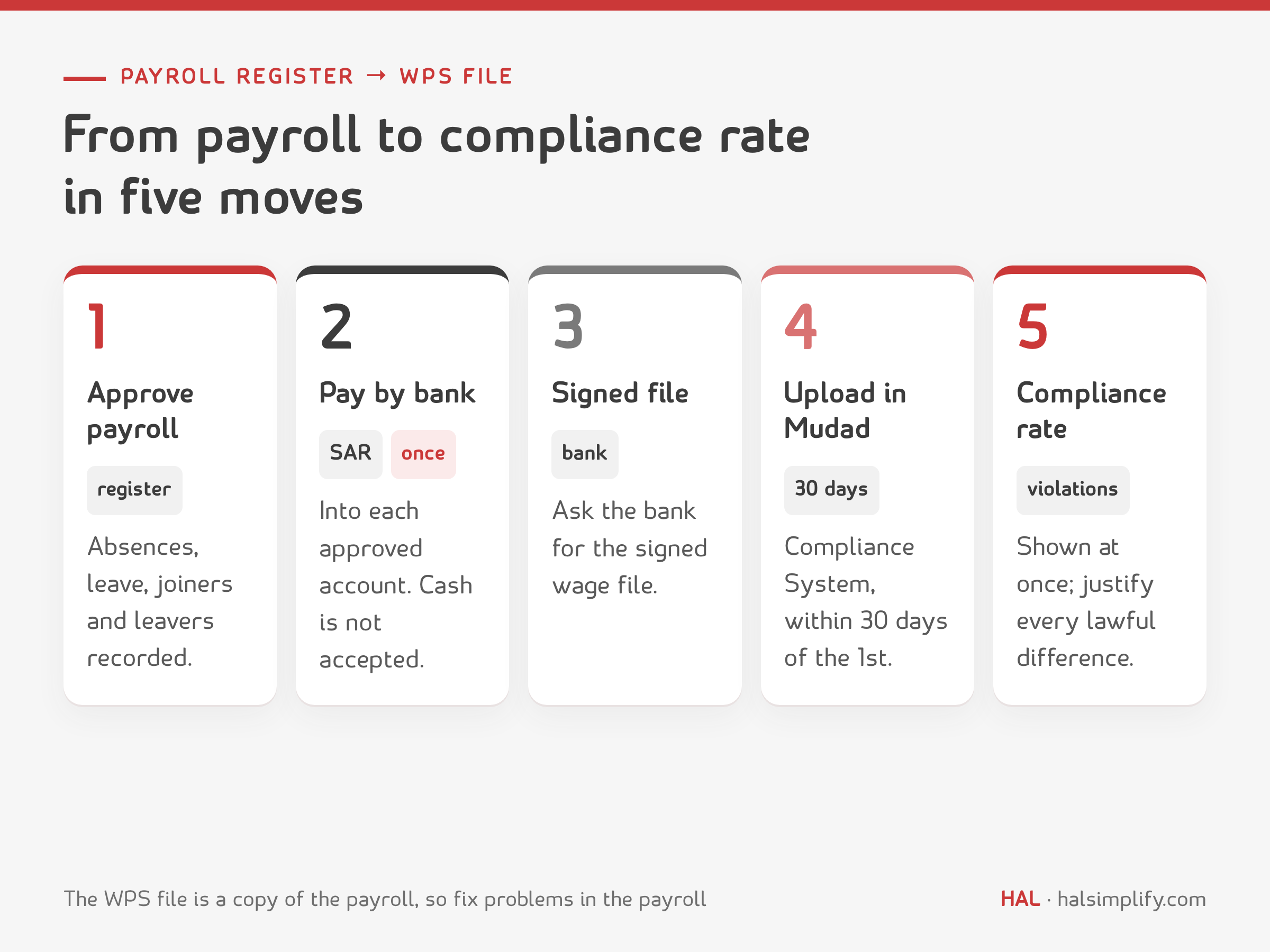
You do not build the WPS file from scratch. It is a copy of the payroll register after payment: you ask the bank for the electronically signed wage file and upload it to Mudad. The system matches the file against the registered employees, and the compliance rate and any violations appear.
So most WPS problems start in the payroll register itself:
When the register is clean and approved before payment, the upload becomes routine.
Mudad also offers an alternative: its own Payroll Management System. Subscribers' files are uploaded automatically with no bank agreement, and an employee without a bank account can be issued an e-wallet.
These are the steps as the Ministry of Human Resources publishes them:
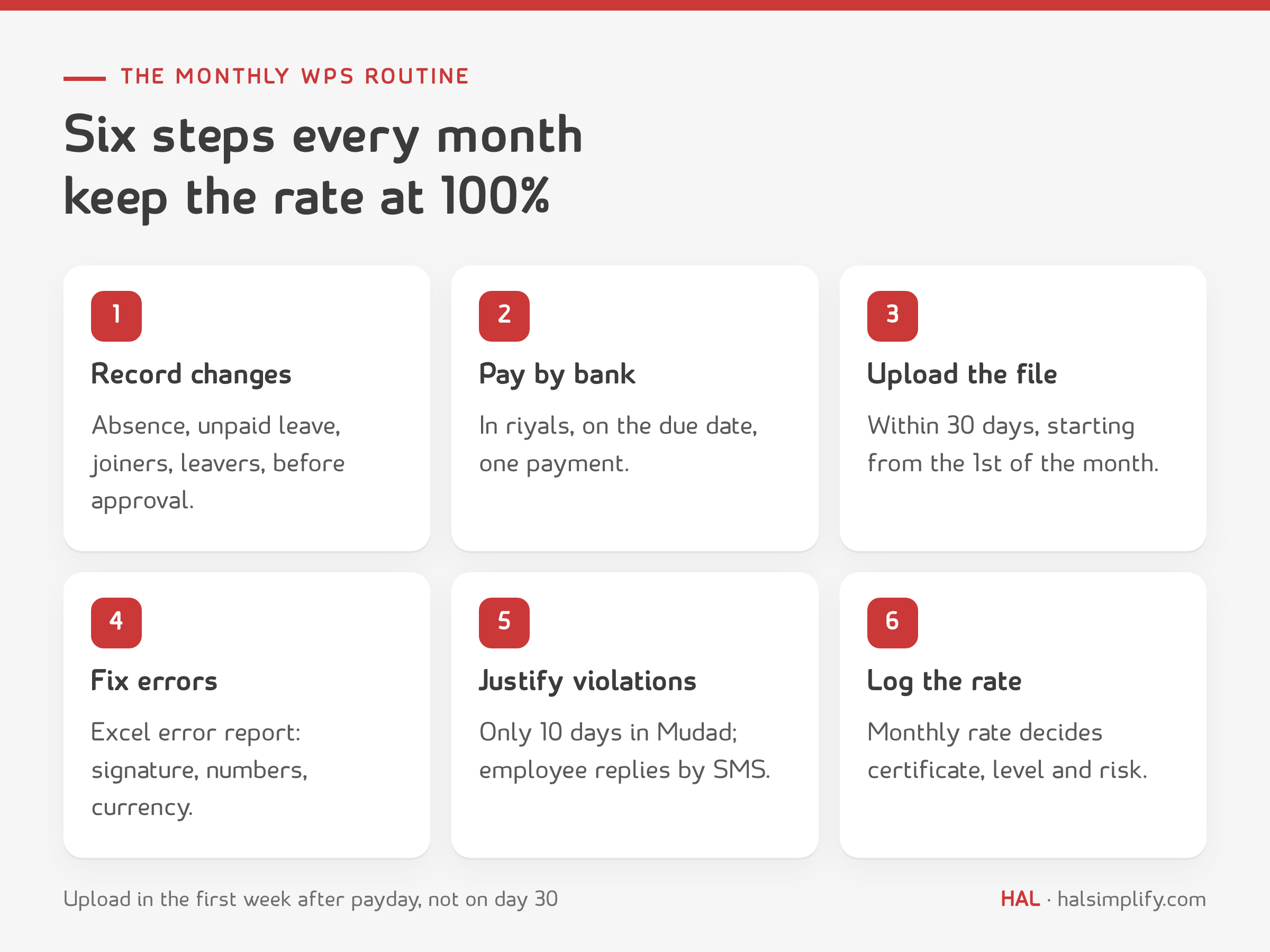
List everything that makes an employee's pay this month differ from the contract:
These are the cases that turn into violations later if nobody justifies them. Establishments on Mudad's Payroll Management System can submit them in advance with Proactive Justification.
Wages are paid in the official currency on their due date into the employee's approved bank account. Cash is not accepted in the file. Paying late, or withholding a wage without a court order, is a separate violation at SAR 300 per worker.
Mudad states that WPS files must be uploaded within 30 days, starting from the first day of each month. The platform emails you when wages fall due and the file is still missing. Do not wait for the reminder: give the upload a fixed slot in the first week after payday, so there is time to fix errors.
If the file or part of it fails, an Excel error report appears next to the file on the Upload Files page. Causes Mudad lists include a missing signature, a wrong number and a currency other than riyals. Correct the file with your bank and upload it again.
Violation details appear on the Violations page after upload. Mudad gives you only 10 days to justify a violation, so do not leave it to the end of the month. Send a justification for every violation that has a lawful reason, such as absence or unpaid leave. The employee receives it by SMS on their Absher-registered number and accepts or rejects it. If they do not respond, the system processes it automatically after 3 days. Justifications for new joiners and leavers go to GOSI instead.
Log the compliance rate every month in one place. It decides three things:
The system matches each employee in the file against what it expects for every registered employee. If the amount differs or the employee is missing, a violation appears even when the payment was correct. Most cases are ones Mudad itself describes:
| Situation | What happens in the file | What to do |
|---|---|---|
| Absence or unpaid leave | Paid amount below the registered wage | Justify it, or justify proactively before upload |
| End of service mid-month | Part salary, or no salary next month | Justify it; leaver justifications go to GOSI |
| New joiner | Part month, or bank account not open yet | Justify it; joiner justifications go to GOSI |
| Late salary or overtime | Paid outside the month | Upload it in a settlement file |
| Cash salary | Not accepted in the file | Pay by bank, or issue an e-wallet through Mudad |
| Unsigned file or wrong currency | Rejected in the error report | Ask the bank for a signed file in riyals |
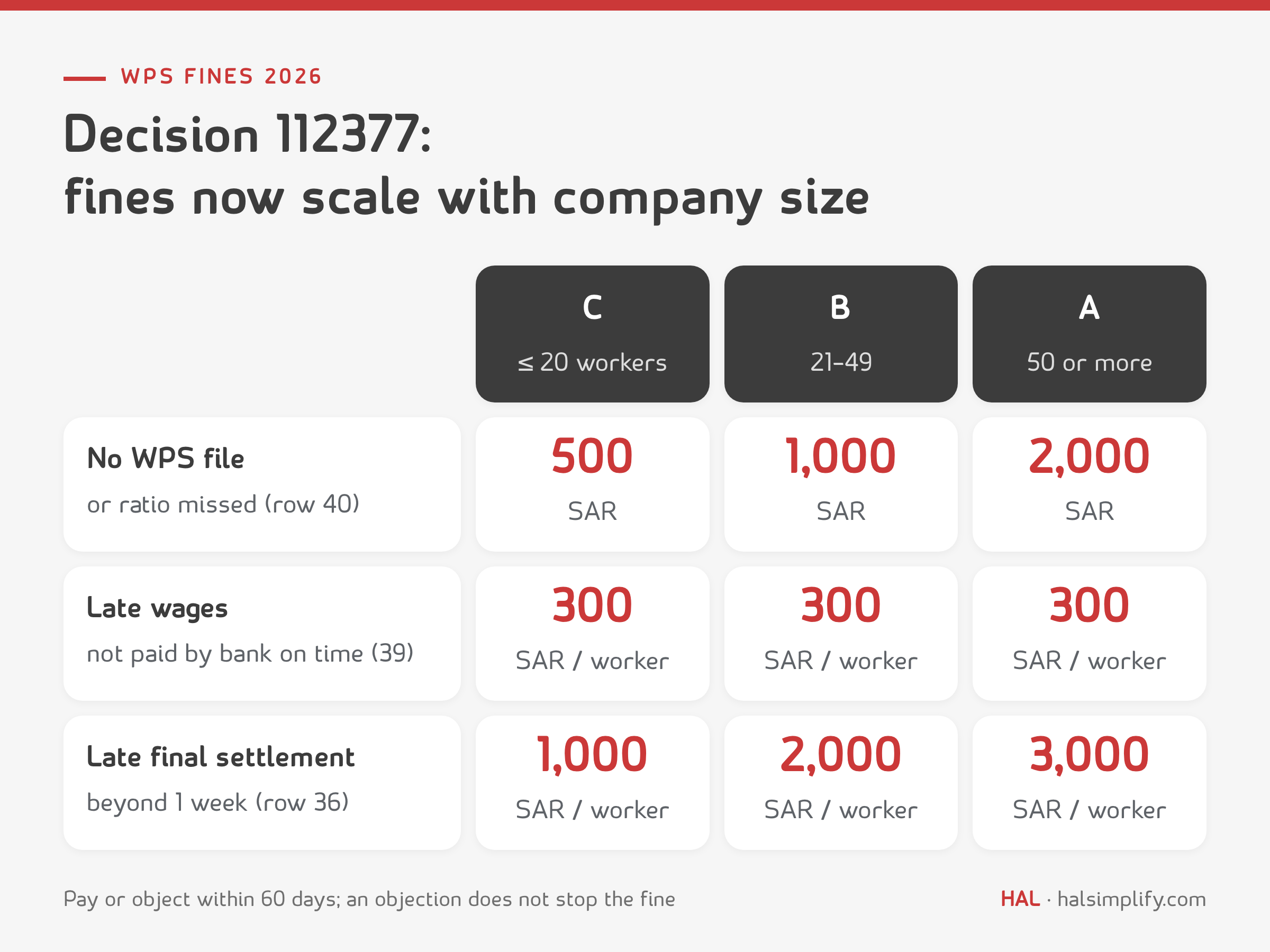
The Ministry of Human Resources amended the Labour Law violations schedule by Ministerial Decision 112377 of 21 Shaban 1447H (9 February 2026). Fines now scale with company size, counted as total workers on the establishment's unified number with the ministry:
| Violation (number in the schedule) | Class | Category C: 20 workers or fewer | Category B: 21–49 | Category A: 50 or more |
|---|---|---|---|---|
| Not uploading the WPS file monthly, or not meeting the compliance ratio set by the ministry (40) | Serious | SAR 500 | SAR 1,000 | SAR 2,000 |
| Not paying wages in riyals on their due dates into approved bank accounts, or withholding wages without a court order (39) | Serious | SAR 300 per worker | SAR 300 per worker | SAR 300 per worker |
| Not paying the final wage and settling dues within a week of the end of employment, or two weeks if the worker ended it (36) | Non-serious | SAR 1,000 per worker | SAR 2,000 per worker | SAR 3,000 per worker |
To work out end-of-service dues before a final settlement, use the end-of-service calculator.
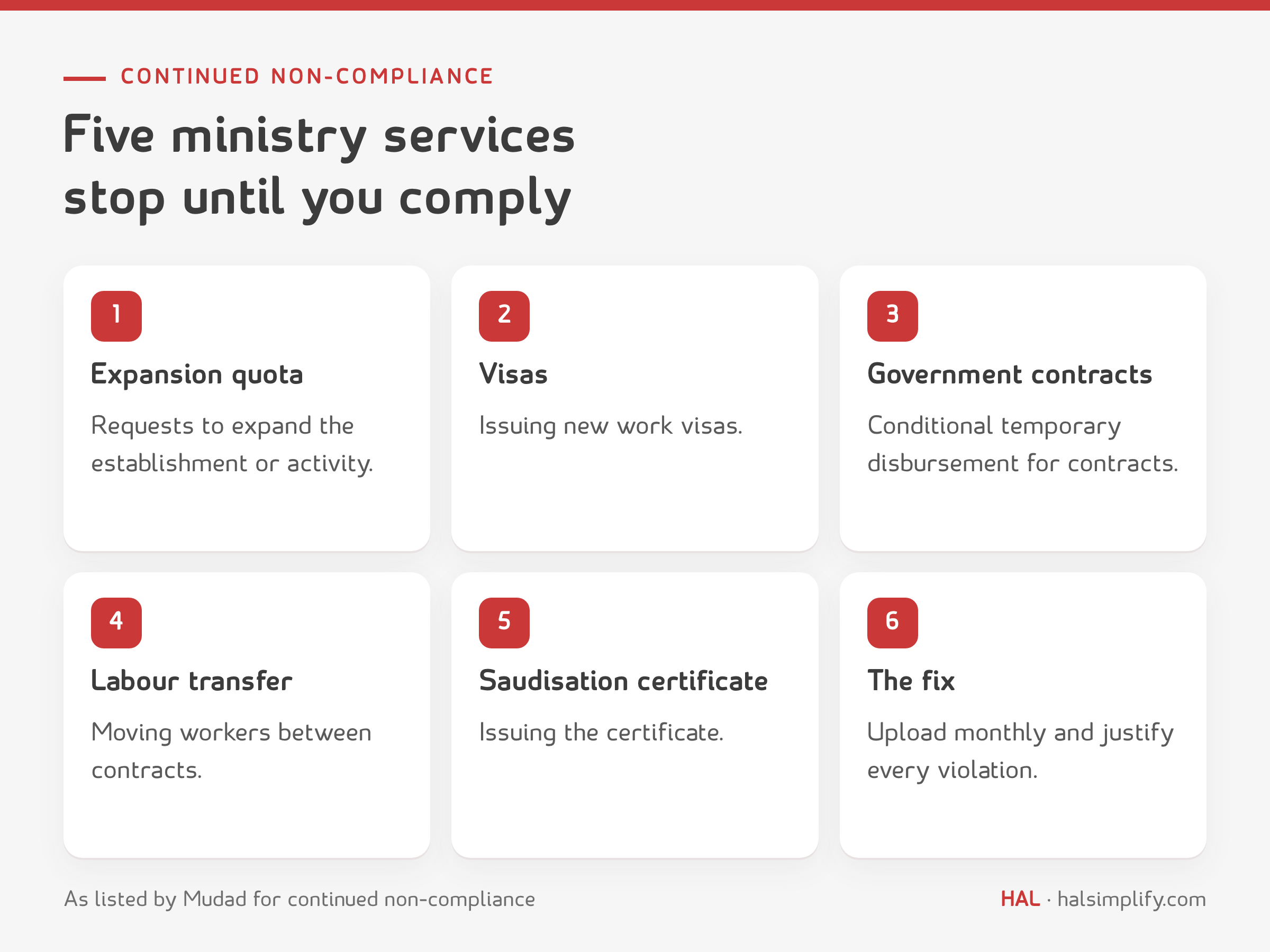
The fine is not the biggest cost. Mudad states that continued non-compliance suspends services with the Ministry of Human Resources, including:
For a company that works with government entities or needs visas, that can mean a stalled project or a delayed hire. That alone is reason to make WPS a fixed line in every month-end close.
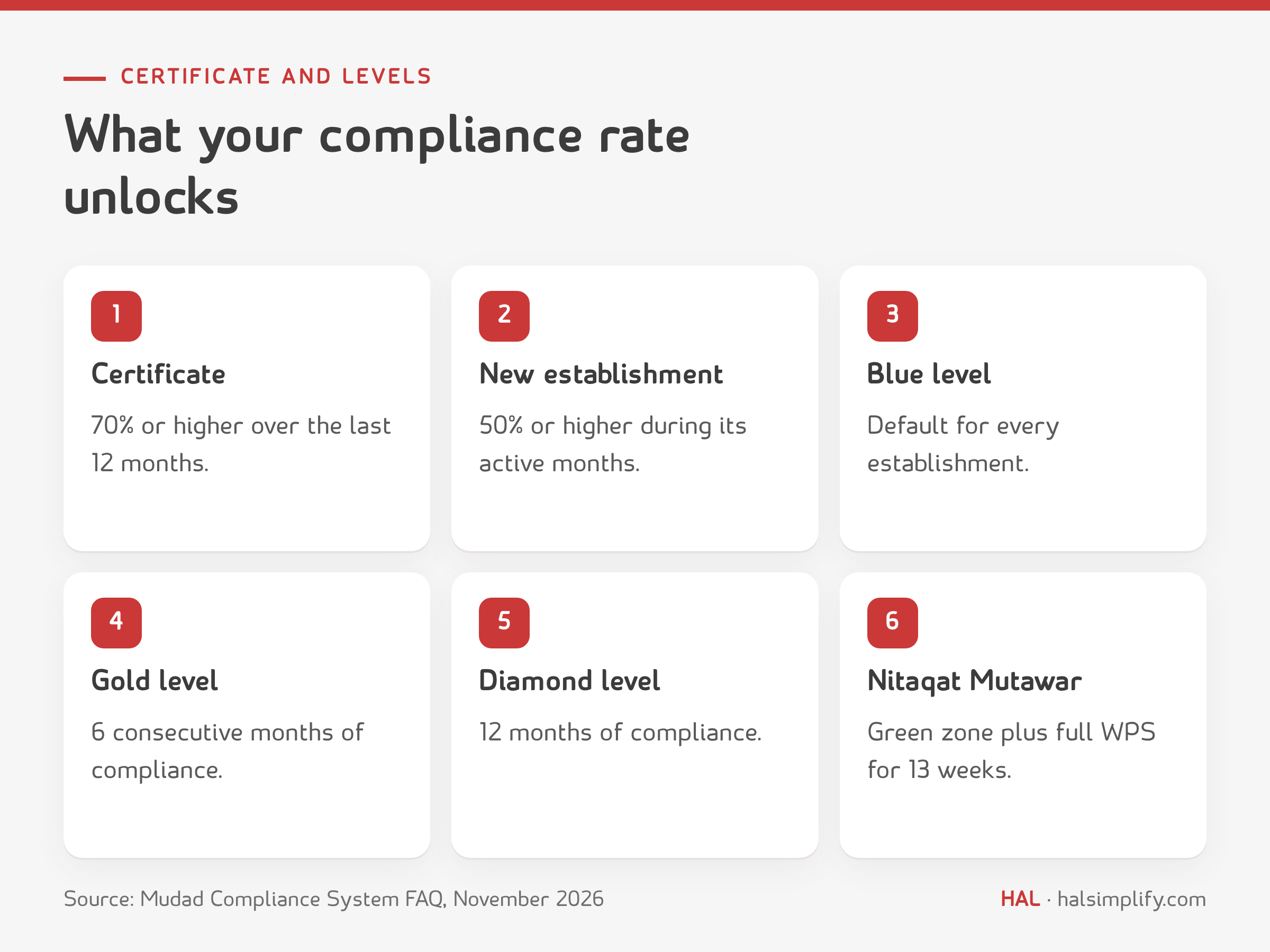
The compliance certificate is issued in Mudad's Compliance System from the "Certificates" icon if:
The Compliance Benefits Programme places establishments in three levels by continuous compliance, each with its own benefits:
| Level | Condition |
|---|---|
| Blue | Default level for every establishment |
| Gold | 6 consecutive months of compliance |
| Diamond | 12 months of compliance |
After a violation, an establishment has one month to keep its level. If the violation is not resolved, it drops one level only. Mudad also says instant enrolment in Nitaqat Mutawar requires staying in the green zone with full WPS compliance for 13 weeks.
The compliance ratio behind violation 40 is not published as a number in the decision. The schedule says "the compliance ratio set by the ministry", and different websites quote conflicting figures (80%, 90% or 95%). The only official published figure is 70% over 12 months, and it applies to the compliance certificate only. So do not aim for a minimum. The practical target is 100% every month, with a justification for every difference that has a lawful reason.
A WPS file is only as right as the payroll behind it. HAL Payroll builds the payroll register from the attendance, leave and loans already recorded in HAL, so absences and leavers show up in the register before payment, not after. It exports a bank-ready report with each employee's IBAN, bank name and bank code, then posts the payroll entry to the accounts on approval. Your bank issues the signed wage file, and you upload it to Mudad.
The tracker gives each month of the year one line:
It also includes the monthly checklist and the fines table for your company's category.
It is a Ministry of Human Resources and Social Development programme that monitors private-sector wage payments and checks they are paid in full, on time and by bank transfer. Employers comply by uploading the wage file to the Mudad platform every month.
Mudad states the file must be uploaded within 30 days, starting from the first day of each month. It is safer to upload in the first week after payday, so there is time to fix the error report and justify violations within the 10-day window.
Under Ministerial Decision 112377 (February 2026) it is SAR 500 for establishments with 20 workers or fewer, SAR 1,000 for 21 to 49 workers and SAR 2,000 for 50 or more. The same fine applies when the required compliance ratio is not met.
No. Mudad states that only bank-transferred salaries are valid in the file. For an employee without a bank account, an e-wallet can be issued through Mudad's Payroll Management System.
Because the amount in the file differs from what the system expects for that employee, for example after an absence, unpaid leave, end of service or a mid-month start. You send a justification within 10 days, the window Mudad allows. The employee accepts or rejects it, and it is processed automatically if they do not respond within 3 days.
70% or higher over the past 12 months, or 50% or higher for a newly established entity during its active months. The certificate is issued from the "Certificates" icon in Mudad's Compliance System.