
Sales cycles stall less from lack of effort and more from lack of visibility. In Saudi Arabia, business operations are already highly digitized: GASTAT reported that 97.7% of establishments had internet access in 2023, while 91.3% used e-government services. As buyers, suppliers, and internal teams move across digital channels, sales activity is increasingly spread across website inquiries, WhatsApp conversations, emails, calls, demos, quotations, approvals, and invoicing.
At the same time, B2B buyers are becoming more selective about how they engage with suppliers. Gartner reports that 61% of B2B buyers prefer an overall rep-free buying experience, while 73% actively avoid suppliers that send irrelevant outreach.
That reality makes spreadsheets and inbox-based follow-ups unreliable. Sales cycle software brings every touchpoint, stakeholder, quotation, follow-up, and next step into one system so teams can keep deals moving, spot risk early, and forecast with confidence.
This guide explains what a sales cycle is, how it works, its stages, and why it matters for predictable revenue growth.
A sales cycle is the path a potential customer takes from initial interest to a buying decision. In Saudi SMB sales teams, it gives structure to opportunities that can otherwise sit across calls, WhatsApp messages, spreadsheets, quotations, and informal approvals.
A sales cycle helps the team understand the current status of each opportunity. Is the customer comparing options, waiting for a revised quote, checking with finance, or asking for stock or service availability?
This matters because a lead can look active without being close to a decision. By tracking the right status, the team can focus on the next useful action instead of repeating the same follow-up.
The cycle usually starts when there is a real sales opportunity, not just a name in a contact list. That may be an inbound inquiry, referral, repeat order request, website lead, or project requirement worth qualifying.
It ends when the opportunity reaches a clear outcome: won, lost, paused, or moved into future follow-up. If the deal is won, the next step is usually an internal handoff to finance, delivery, service, inventory, or project teams. This keeps the sales cycle connected to operations without turning it into a full post-sale process.
A sales cycle usually becomes longer when:
As a Saudi company grows, sales becomes harder to manage through memory, personal follow-up habits, or scattered spreadsheets. A clear sales cycle becomes non-negotiable when missed calls, delayed quotes, weak qualification, or poor handoffs start affecting revenue.
In a small team, one salesperson may remember every lead, quotation, and customer promise. That stops working when inquiries increase across phone calls, WhatsApp, referrals, website forms, and repeat customers.
A clear cycle shows what should happen next: first call, revised quote, customer approval, payment-term clarification, or final decision. This helps the team follow up based on deal status, not habit or guesswork.
A growing company does not only need to know how many leads are open. It needs to know why some opportunities are not moving.
A defined sales cycle helps owners and sales managers spot overdue calls, stalled quotations, weak qualification, delayed approvals, or proposals waiting for customer feedback. This makes the problem visible before the month-end target is already at risk.
Sales does not end when the customer agrees. The deal still needs to move into invoicing, stock reservation, delivery, service scheduling, or project execution.
For Saudi SMBs, this handoff can easily break if quote details, payment terms, delivery commitments, or service requirements stay with one salesperson. A clear sales cycle helps capture the information other teams need, so a closed deal does not turn into an operational delay.
Also Read - 7 Best CRM Software for Small Business Sales in Saudi Arabia (2026)
These terms are often used together, but they do not mean the same thing. For Saudi SMB sales teams, separating them helps avoid confusion when reviewing leads, follow-ups, quotations, and revenue forecasts.
As leads increase, the bigger challenge is keeping every opportunity visible, updated, and moving. That is where sales cycle software reduces the manual burden.
Sales cycle software is a digital platform that helps businesses manage, track, and improve the full sales process, from lead generation to deal closure and post-sale follow-up. The goal is to keep every opportunity moving forward with clear stages, owners, next steps, and measurable progress.
Most sales cycle software typically brings together:
For sales teams that also manage walk-in customers, product availability, billing, and daily transactions, sales cycle tracking should not sit separately from point-of-sale activity. HAL POS can help Saudi SMBs connect customer interactions, sales records, inventory movement, and operational follow-ups in one workflow.

Sales cycle software centralizes lead, account, and deal activity in one system so every opportunity has a clear owner, stage, and next step. More importantly, it turns day-to-day selling into a process you can audit, measure, and improve. Instead of relying on memory or scattered notes, teams work from a single source of truth.
Full visibility across the funnel, fewer stalled opportunities, faster handoffs between reps and managers, and forecasts that match reality more closely.
Also Read: CRM Sales Pipeline Report: Key Elements, Metrics, and Best Practices [2026 Guide]
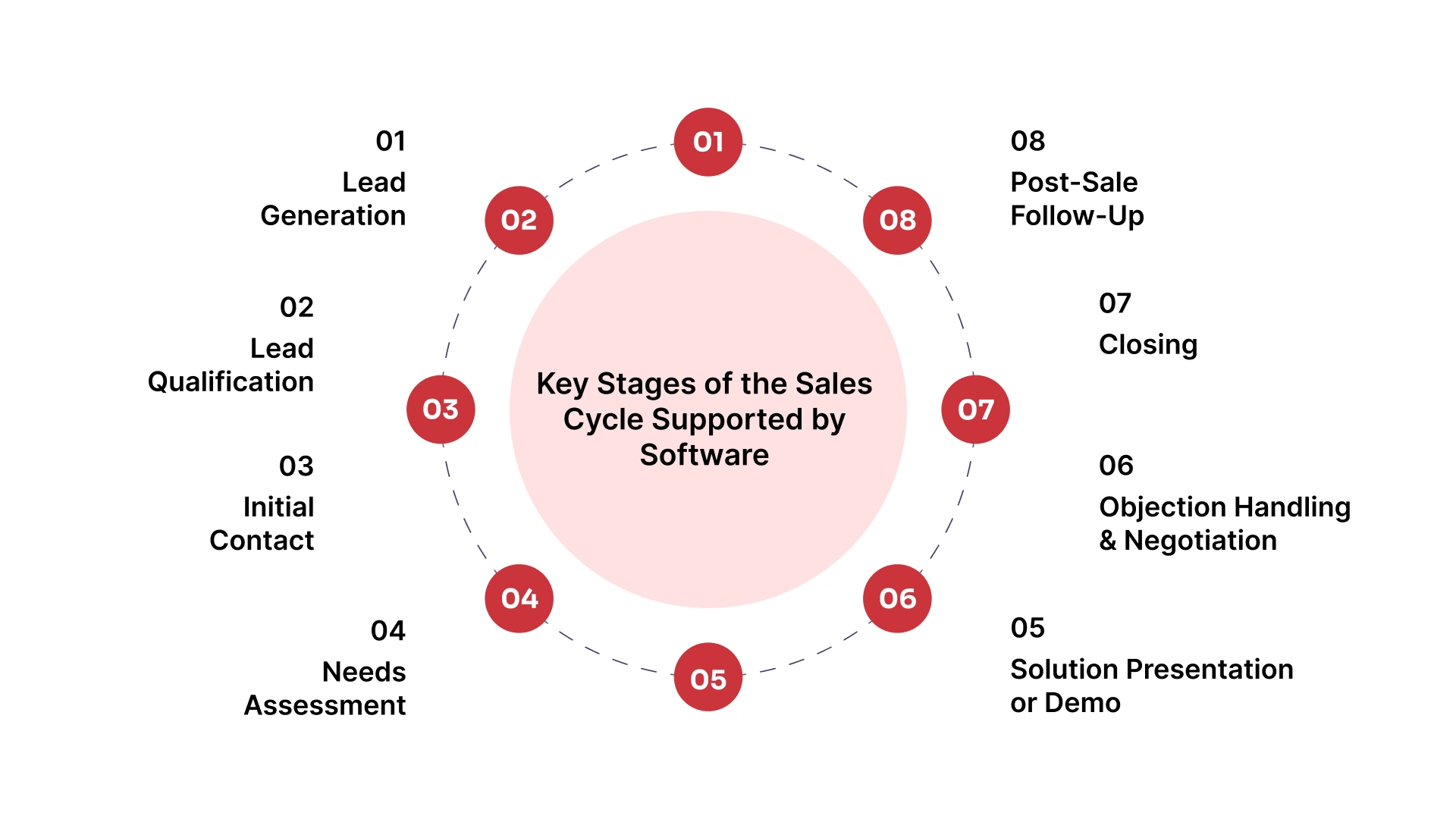
Sales cycle software supports the full buyer journey by turning each stage into a trackable workflow. Instead of “moving deals forward” based on intuition, teams define what must happen at each step, capture the right data, and create clear next actions. That structure is what reduces deal slippage and improves forecasting quality.
Lead generation is about creating a steady flow of potential buyers so the pipeline does not depend on a few “lucky” opportunities. Software helps capture leads cleanly and keeps source data intact for better pipeline quality.
Identifying potential buyers through
Software role
Qualification protects sales time by separating real opportunities from low-fit leads. Software makes this step repeatable so reps prioritize the right accounts and reduce pipeline noise early.
Determining fit based on
Software role
Initial contact sets the tone for the entire deal by confirming interest and establishing next steps. Software keeps outreach consistent and ensures follow-ups do not slip when multiple deals are active.
Channels
Software role
Needs assessment is where deals gain clarity or quietly stall. Software keeps discovery structured by organizing notes, tracking stakeholders, and documenting requirements that later drive the proposal.
Activities
Software role
This stage is about proving fit and building confidence across the buying committee. Software supports smoother demos and proposals by keeping materials, versions, and engagement in one place.
Activities
Software role
Negotiation is where complexity peaks, with pricing, approvals, and terms moving in parallel. Software keeps the deal controlled by tracking changes, documenting decisions, and supporting approval workflows.
Activities
Software role
Closing is about converting verbal agreement into signed commitment with clean handoffs and accurate reporting. Software reduces last-minute confusion by centralizing contracts, approvals, and final deal updates.
Activities
Software role
Post-sale follow-up protects long-term revenue by supporting onboarding, adoption, and renewals. Software keeps customer history accessible so account management stays proactive instead of reactive.
Activities
Software role

Once the sales cycle stages are clear, the next step is to measure how well opportunities move through them.
Once each sales cycle stage is clearly tracked, sales teams can see more than who is following up. They can see where deals slow down, which stages lose the most opportunities, and whether delays come from the customer, the salesperson, or an internal handoff.
The average sales cycle length shows how long it takes a won opportunity to move from the first recorded interest to closure.
Formula: Average sales cycle length = total days to close won deals ÷ number of closed deals.
This becomes more useful when opportunities are tracked by deal type. A repeat trading order, service contract, project quotation, and ERP purchase may each have a different normal timeline.
Stage conversion shows how many opportunities move from one stage to the next. For example, a team can compare inquiries to qualified leads, qualified leads to quotations, quotations to negotiations, and negotiations to closes.
If many leads drop before quotation, the issue may be a poor fit or weak qualification. If many quotations fail to close, the problem may sit in pricing, payment terms, proposal clarity, or follow-up timing.
Time-in-stage shows where opportunities lose momentum. A quote may wait for pricing approval, a negotiation may pause over payment terms, or a project deal may stay open while the customer confirms budget.
For Saudi SMBs, this matters because delays are not always caused by sales. They may come from finance, inventory, delivery, service, or project teams.
Each closed or lost deal should have a simple reason: price, urgency, stock availability, delivery timing, payment terms, competitor choice, or customer fit.
Over time, these reasons help owners and sales managers improve the cycle based on patterns. The goal is not just better reporting. It is knowing which stage needs attention before the same problem repeats across future deals.
Once your sales stages and metrics are tracked, the next question is where that sales data needs to go. A standalone CRM may be enough for managing leads and follow-ups, but growing Saudi SMBs often need sales activity to connect with quotations, inventory, finance, delivery, service, or project execution.
A standalone CRM can work well when the main challenge is sales visibility. If the team mainly needs to assign leads, record calls, schedule follow-ups, and review open opportunities, CRM may cover the immediate need.
This is common when deals are simple, approvals are limited, and sales does not depend heavily on stock checks, finance review, delivery planning, or service capacity before closing.
CRM becomes less useful on its own when the sales team can see the opportunity but cannot act on the information needed to move it forward.
For example, a salesperson may need updated stock availability before confirming a quotation. Finance may need approved quote details before invoicing. Operations may need delivery or service instructions once the deal is won.
If these steps happen in separate tools, the sales cycle is tracked but still disconnected.
ERP-connected workflows make sense when sales data must move across departments without being re-entered manually. This helps the business connect customer records, quotations, approvals, invoices, stock, delivery, and service work more smoothly.
To turn leads into sales, a team needs more than a place to record follow-ups. HAL ERP connects CRM visibility with ERP workflows, helping Saudi SMBs move from opportunity tracking to confirmed, executable sales.


HAL ERP helps sales teams move from lead tracking to sales execution with CRM capabilities built inside an agentic ERP platform. Instead of keeping customer activity, follow-ups, quotations, and handoffs in separate tools, HAL brings them into one connected workflow supported by intelligent AI agents.
HAL CRM gives sales teams one place to manage leads, customers, conversations, opportunities, and follow-ups. Every interaction becomes easier to track, review, and act on because customer data stays connected inside the wider ERP environment.
This helps teams reduce scattered updates across spreadsheets, chats, and individual notes.
HAL’s AI agents work inside the CRM to support the team as deals move forward. They help prepare for meetings, assess conversations, identify buyer signals, flag stalled opportunities, and recommend the next best action.
This turns CRM from a passive record of activity into a guidance layer that helps sales teams act with better timing, context, and confidence.
HAL ERP helps teams keep the sales cycle structured from inquiry to quotation, order, and invoicing. Sales managers can see where opportunities stand, which deals need attention, and where follow-ups or approvals may be slowing progress.
With agentic insights, pipeline reviews become less dependent on guesswork and more focused on deal health, next steps, and execution readiness.
HAL connects lead management with sales orders and invoicing, so the sales cycle does not stop at “deal won.” Once a customer is ready to proceed, the required details can move more smoothly into finance, delivery, inventory, service, or project workflows.
HAL ERP automates and reports across the sales cycle, helping teams reduce manual work and improve visibility. Repetitive follow-ups, missing updates, delayed approvals, and scattered reports become easier to manage when sales data is connected with ERP workflows.
Book a demo to see how agentic CRM inside ERP can help your team turn leads into confirmed, executable sales.
Sales cycle software transforms selling from a fragmented, manual process into a structured and measurable system. By giving visibility across every stage, from lead capture to closure and follow-up, it helps teams move deals faster, improve efficiency, and forecast revenue with more confidence.
If your pipeline still depends on scattered tools and manual updates, book a demo with HAL ERP to see how its CRM-enabled ERP workflow supports end-to-end sales cycle management, stronger follow-ups, and cleaner execution from lead to invoicing.
Not always. A CRM is usually the core database for contacts, accounts, and deals, while sales cycle software often adds tighter stage workflows, activity automation, forecasting, and playbooks to manage progression end to end.
When deals keep stalling and no one can clearly explain why. If follow-ups are inconsistent, pipeline stages are not standardized, and forecasting depends on gut feel, you need a structured system.
It uses real pipeline signals like stage movement, activity history, and deal updates instead of manual assumptions. Over time, structured data makes projections more realistic and easier to validate.
Yes. It keeps next steps visible, triggers reminders, and standardizes follow-up workflows so opportunities do not sit idle. Managers can also spot bottlenecks earlier and intervene before momentum is lost.
Businesses where sales depends on quoting, inventory, delivery timelines, and invoicing, such as manufacturing and distribution. A CRM-enabled ERP connects selling to execution, reducing handoff errors and improving end-to-end visibility.