CRM in Sales Process Automation: A Guide to Closing Deals Faster
Published By
Mohammed Ali Khan
ERP/Retail
Aug 10, 2026
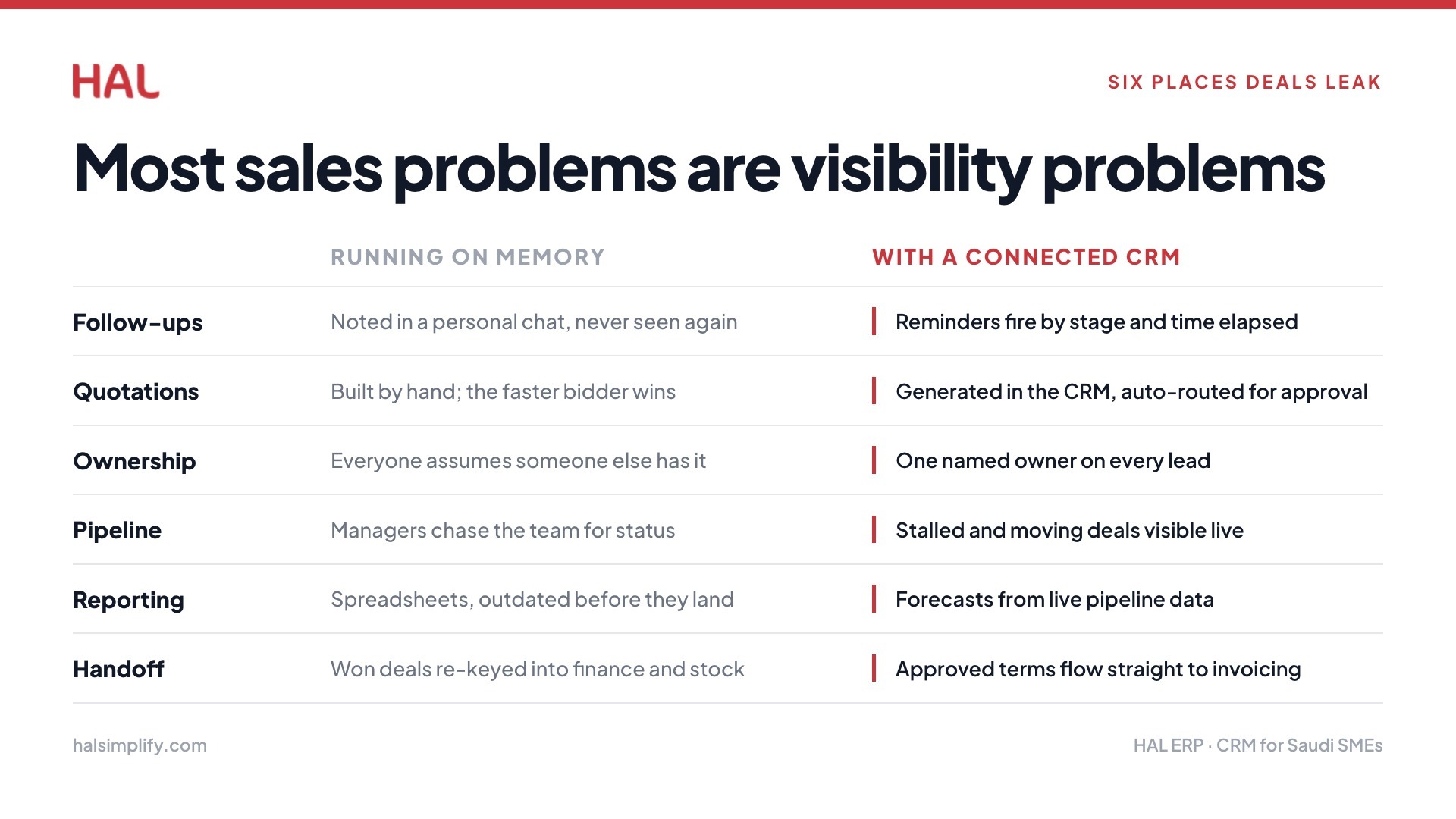
Most sales problems are not really sales problems. At large, they are visibility problems. A lead comes in through WhatsApp, gets followed up on twice, then disappears into someone's notes. No record, no next step, no closure.
Saudi Arabia's business process automation market is on course to reach USD 815 million by 2030. Sales process automation sits at the heart of this growth.
Businesses are now actively looking for better ways to track, manage, and close deals without relying on memory and manual effort. A sales CRM not only removes these bottlenecks but also helps teams actively close deals faster.
This article covers the full picture. We will discuss what CRM in the sales process means, what it automates, and how businesses like yours can use it to close more deals with less friction.
Key Takeaways
CRM in sales process handles lead capture, follow-up, quoting, pipeline updates, and invoice handoffs without manual effort.
Sales teams often lose deals to missed follow-ups, delayed quotes, and unclear lead ownership, not lack of effort.
A CRM connected to finance and inventory removes costly handoff delays after a deal closes.
Different industries like trading, retail, contracting, and services face unique sales bottlenecks that CRM automation directly addresses.
Automating a messy process first makes it messier; clean up your sales stages before building CRM workflows.
What Is CRM in Sales Process Automation?
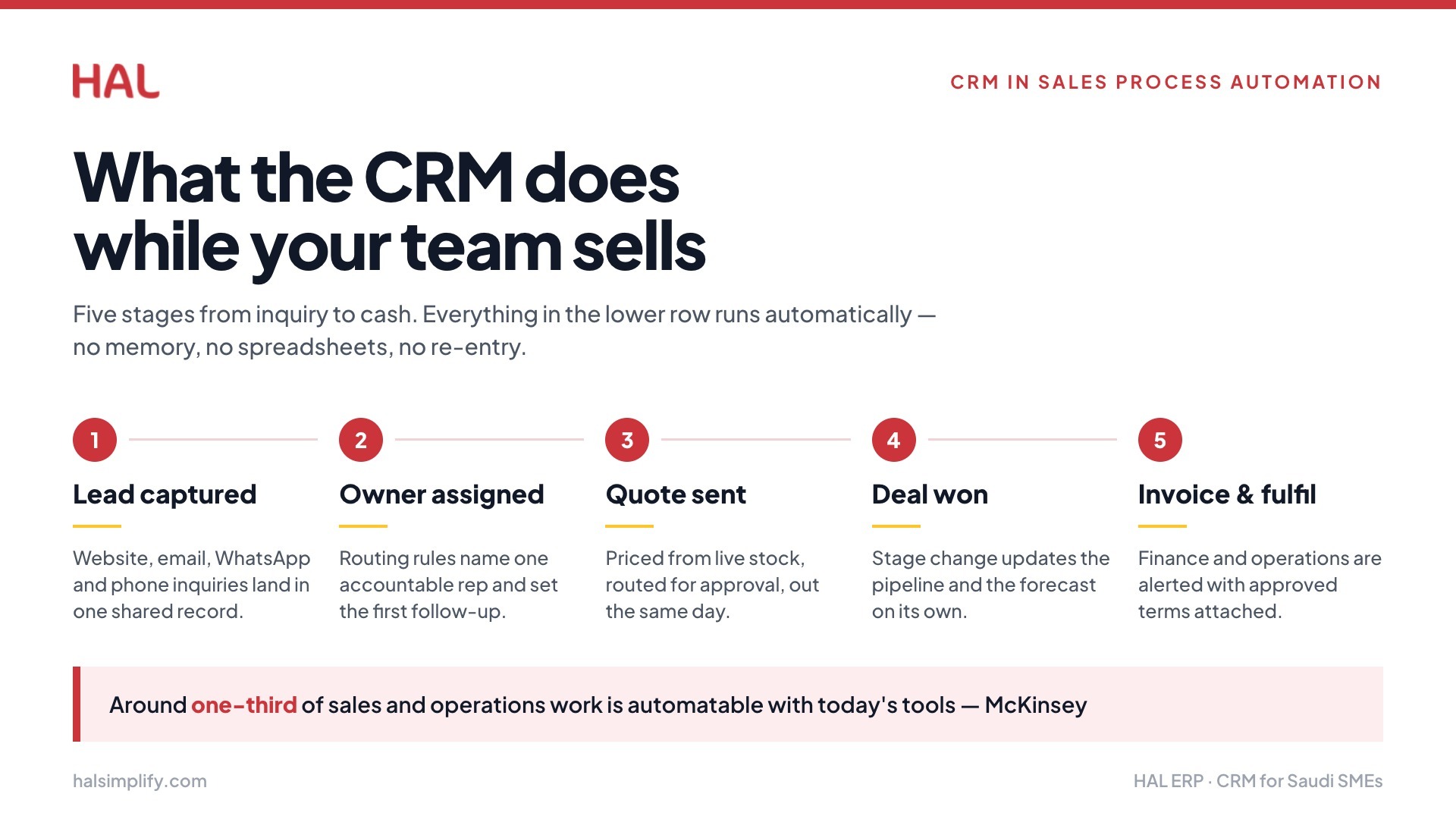
CRM in sales process automation means using your CRM to handle repetitive sales tasks automatically. Instead of a salesperson manually updating deal stages, sending follow-up reminders, or logging every customer interaction, the CRM does it for them.
The tasks this covers include lead capture, lead assignment, follow-up scheduling, quote movement, deal stage updates, pipeline tracking, and customer record updates. Basically, anything that a salesperson does the same way every time is a candidate for automation.
For example, a Saudi trading company may receive a new inquiry through WhatsApp or its website. The CRM can create the lead, assign it to a salesperson, set a follow-up reminder, and track whether a quote was sent.
That means the lead does not depend on someone remembering it after a busy day. It also helps managers see what is moving, what is stuck, and what needs action before a deal goes cold.
Which Sales Tasks Can a CRM Automate?
A well-configured CRM takes the repetitive work off your sales team's plate entirely. A A McKinsey report says that with today’s tools, businesses can automate roughly one-third of their sales and operations work. Here is what it can handle automatically.
Lead capture and assignment: Every new inquiry from your website, email, or integrated channels gets logged and routed to the right salesperson without manual input.
Follow-up reminders: The CRM schedules reminders based on deal stage or time elapsed, so no lead goes cold simply because someone forgot to check back.
Quote creation and approval routing: Sales reps can generate quotes directly from the CRM, with automatic routing to managers for approval before sending.
Pipeline stage updates: As deals progress, stage changes can trigger automatic updates so the pipeline always reflects current reality without manual entry.
Customer activity tracking: Every call, email, meeting, and message is logged against the customer record, giving full context before any interaction.
Sales forecasting: The CRM uses live pipeline data to project revenue by week, month, or quarter without requiring a separate spreadsheet.
Payment or invoice handoff alerts: When a deal closes, the CRM can automatically notify the finance team and trigger the invoicing process.
Renewal or repeat order reminders: For businesses with recurring customers, the CRM can flag when a renewal is due or when a customer has not reordered within their usual cycle.
The Risks of Not Using a CRM for Your Sales Process
If you are a growing businesses and not using a sales CRM to automate and manage your sales process, you are simply making an already challenging process insurmountable. Below, we have laid out the common bottlenecks businesses face without a capable sales CRM system on their side:
Missed follow-ups: A lead from WhatsApp or email gets noted somewhere personal and never enters a shared system, so no one follows up when it matters.
Delayed quotations: Preparing a quote manually takes time, and in competitive sectors like trading or contracting, a slow quote often means a lost deal.
Unclear ownership: When a lead is not assigned to a specific person in the system, everyone assumes someone else is handling it.
Weak pipeline visibility: Founders and sales managers cannot see which deals are progressing and which are stalled without chasing their teams for updates.
Manual reporting: Sales reports built from spreadsheets take time to prepare and are often outdated by the time they reach decision-makers.
Poor handoff to finance or operations: When a deal closes, the details often have to be re-entered into another system, causing delays in invoicing or delivery.
Industry-Specific Advantages of Using a Sales CRM
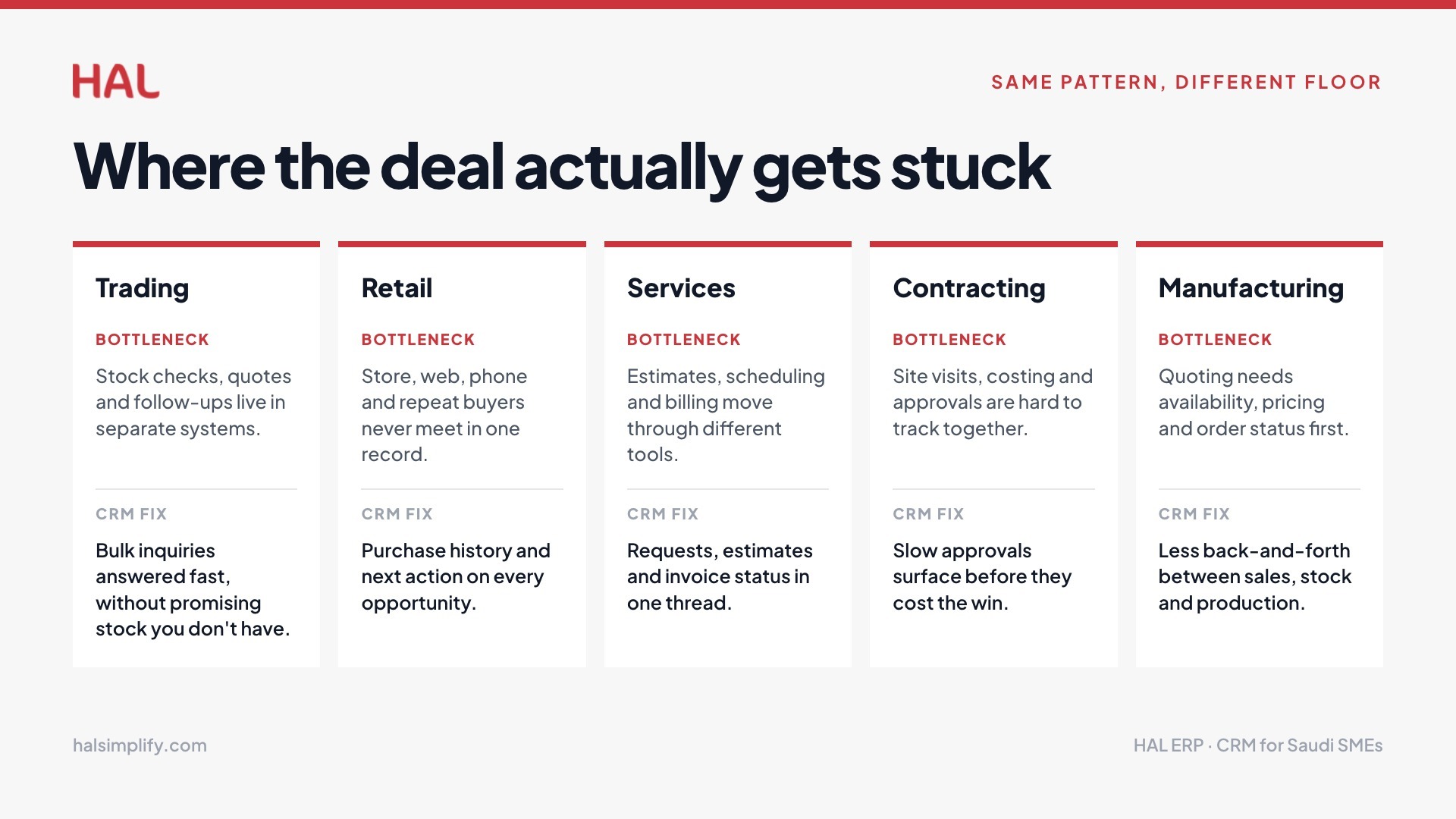
Different industries face different sales bottlenecks, but the pattern is similar. A sales CRM connects customer activity, follow-ups, and operational context, as shown clearly below.
Industry
Common sales bottleneck
How CRM automation helps
Business advantage
Trading and distribution
Sales teams manage stock checks, quotations, and customer follow-ups across separate systems.
Connects lead records, inventory visibility, quotation status, and follow-up reminders in one workflow.
Teams respond faster to bulk inquiries and avoid promising products that are unavailable.
Retail
Customer inquiries come from stores, websites, phone calls, and repeat buyers without one clear record.
Centralizes customer activity, purchase history, lead source, and next action for every sales opportunity.
Staff can handle repeat customers, corporate buyers, and store-level inquiries with better context.
Services
Estimates, scheduling, customer updates, and billing often move through different people and tools.
Connects service requests, estimates, follow-ups, schedules, and invoice status in the sales process.
Teams reduce delayed responses and give customers clearer updates before the deal goes cold.
Contracting
Site visits, estimates, approvals, costing, and client communication are hard to track together.
Links lead details, site notes, quotation approvals, project cost inputs, and deal progress.
Managers see where each opportunity stands before slow approvals affect the win rate.
Manufacturing
Sales teams need product availability, pricing, order status, and customer requirements before quoting.
Brings customer records, product details, quotation history, and production or inventory context together.
Teams quote more confidently and reduce back-and-forth between sales, stock, and operations.
HAL ERP includes a natively built CRM module designed specifically for Saudi SMEs and growing businesses. It connects sales, inventory, finance, and customer support in one platform. HAL's agentic AI handles follow-ups, pre-meeting research, and win probability forecasting automatically, so your team stays focused on closing rather than administrating.
Common Mistakes to Avoid When Automating the Sales Process
CRM automation works best when the sales process is clear enough for people to follow every day.
The goal is to remove confusion before the system repeats it faster across the team.
Automating a messy process: Clean lead stages, ownership rules, quote steps, and follow-up timing before building CRM workflows.
Choosing unused features: Pick automations sales reps will use during calls, quotes, follow-ups, and customer updates, not only reports for managers.
Keeping CRM separate: Connect CRM with quotes, invoices, inventory, and operations when those areas affect promises made to customers.
Measuring only activity: Track deal progress, quote speed, closed revenue, lost reasons, and collection impact, not only calls or meetings.
Why a Connected Sales CRM Works Better Than a Standalone CRM
CRM automation becomes more valuable when the sales record can travel beyond the sales team. In many businesses, such as contracting, a closed deal still needs finance, inventory, delivery, service, or project teams to move the customer request forward.
Without that connection, the CRM can show a won deal while the business still waits for the next handoff. This is where sales automation needs stronger business data behind it.
For trading, retail, services, contracting, and distribution companies, the sale depends on more than follow-up speed. It also depends on price accuracy, stock visibility, payment terms, delivery capacity, and clean reporting.
The advantages of a connected sales CRM include:
Finance receives cleaner quote context: Approved price, discount, VAT, payment terms, and customer details move from sales to finance without forwarded messages. This helps invoices go out faster and reduces back-and-forth before payment follow-up begins.
Inventory confirms before sales promises: Sales teams can check stock, quantity, and availability before confirming delivery dates or customer terms. This protects customer trust when demand changes or fast-moving items need closer control.
Operations prepares work earlier: Delivery, service, project, or fulfilment teams can see customer requirements after approval. This reduces missing details and helps the team plan the next step sooner.
Managers see revenue movement clearly: Leaders can view pipeline value, pending quotations, won deals, invoices, and expected collections in one flow. This makes sales reporting more useful for daily decisions.
Customers get fewer delays after approval: A connected CRM helps each approved deal move into order, invoice, stock, or service work faster. This makes the buying experience feel more organised from the customer side.
This way, the CRM stops being only a place to store contacts and becomes a way to move revenue work forward.
How HAL Helps Automate the Sales Process and Remove Friction
As discussed above, sales automation works best when CRM connects with the rest of the business.
HAL places CRM inside the wider ERP flow instead of treating it as a separate contact tool. This helps businesses manage leads, customers, quotes, sales activity, stock, invoices, and reports from one connected system.
Customer management: HAL helps teams keep customer details, communication history, sales activity, and account information in one place. This gives salespeople better context before each call, quote, or follow-up.
B2B sales tracking: HAL supports businesses that manage longer sales cycles, repeat customers, negotiated pricing, and account-based selling. Teams can track deal progress without depending on scattered spreadsheets or personal notes.
Lead and customer tracking: New leads can be tracked from first inquiry through follow-up, quotation, approval, and closure. This helps owners and managers see where each opportunity stands.
Sales pipeline monitoring: HAL gives teams a clearer view of open deals, pending quotations, expected closures, and stalled opportunities. This makes daily sales review more useful.
Sales forecasting: HAL helps leaders review expected revenue based on pipeline activity, deal value, and sales progress. This supports better planning across cash flow, stock, and operations.
AI-powered reporting: HAL’s AI-powered reporting and conversational ERP (HALA) experience help teams ask business questions and access useful sales insights faster. This makes reporting easier for busy decision-makers.
POS and subscription support: Retail and service businesses can manage sales activity across point-of-sale, subscriptions, and customer accounts. This helps connect front-end sales with back-end records.
Finance and invoicing connection: Once a deal is approved, sales information can support invoice creation, payment follow-up, and revenue tracking. This reduces repeated data entry between teams.
Inventory and procurement connection: Sales teams can work with better stock and availability context before committing to quantity or delivery timelines. This is useful for trading, retail, and distribution businesses.
Operations and HR connection: When sales demand grows, operations and HR need better visibility into delivery load, service schedules, and staffing needs. HAL helps connect sales activity with execution planning.
In short, if your sales team is losing time to manual follow-ups, scattered customer data, or disconnected handoffs, HAL can help you build a cleaner sales process.
Case study: Masaahaat, a Saudi marketing agency that needed better control over sales and financial work. Before HAL, the team dealt with disconnected systems, delayed collections, limited visibility into quotations, and manual finance processes.
HAL helped connect sales, finance, and procurement into one system, while automating quotations, invoicing, and financial postings. The result was more than 40 million SAR saved through automation and a 10x return on investment.
This is the point of connected CRM automation. It helps each sales action move into the next business step with less delay, better visibility, and stronger control.
Ready to empower your sales team? Book a demo today to experience HAL in action.
FAQs
1. What is CRM in the sales process?
CRM in the sales process means using software to automate lead tracking, follow-ups, quoting, pipeline updates, and customer record management.
2. How does CRM automation help close deals faster?
It removes manual steps between lead capture and closure, so sales teams respond faster, quote sooner, and follow up without relying on memory.
3. Can a CRM integrate with invoicing and inventory?
Yes. A connected CRM passes closed deal details to finance and inventory automatically, reducing re-entry delays and improving handoff accuracy.
4. What sales tasks can a CRM automate?
Lead assignment, follow-up reminders, quote routing, pipeline stage updates, customer activity tracking, sales forecasting, and invoice handoff alerts.
5. Why do CRM implementations fail for sales teams?
Usually, because the sales process was unclear before automation was applied. Clean lead stages and ownership rules first, then build workflows around them.
Mohammed Ali Khan
Mohammed Ali Khan is a seasoned ERP Implementation Consultant with over 100 successful projects across Saudi Arabia. With expertise across diverse industries, he has spearheaded large-scale implementations for customers across Construction/Contracting and Retail industry to name a few. He is fluent with regional challenges and Saudi Specific compliance requirements.