In short: The best school management system for a private or international school in Saudi Arabia is the one that invoices every student's fees with the right VAT treatment, collects instalments and tracks overdue balances week by week, and keeps admissions, attendance, timetables, exams and payroll on one record. It should also pass a demo run on your own school's data. This guide covers what the system must run, a worked SAR example for a 900-student school, a weighted scorecard, questions for vendors, a 30-day selection plan and a free kit (PDF guide and Excel workbook).
Mid-February, with the second term nearly over. The finance manager of an international school in Riyadh opens three Excel files: the bank statement, the instalment register, and a list from student affairs of children who have not received their textbooks. The owner asks one question: how much do parents owe us right now, and since when? The answer takes two days. Meanwhile the office sends reminders to families who paid last week, and the accountant finds that two brothers from the same family were invoiced with different VAT treatment.
The staff are not the problem. The school runs on separate tools: a student program, fee spreadsheets, a payroll package and a WhatsApp group for parents. This guide explains how to choose one system that brings them together, with the questions an owner, general manager, finance manager and principal ask together.
Before comparing names, write down what your school actually runs. Most private (ahliyya) and international schools with 51 to 500 staff need six areas working on one student record and one family record.
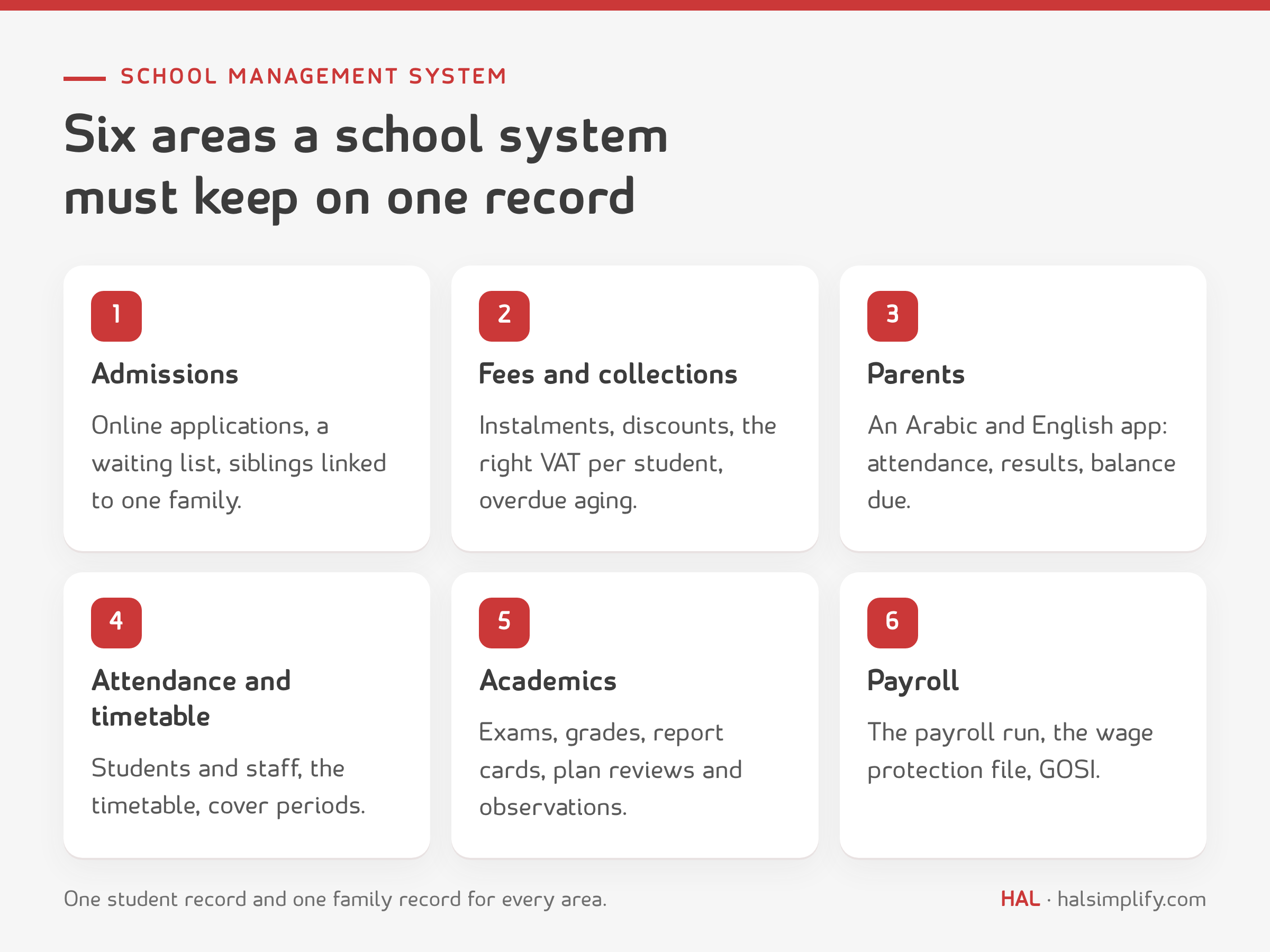
| Area | What to check in the system |
|---|---|
| Admissions and enrolment | Online application, student documents, a waiting list, annual re-enrolment, siblings linked to one family. |
| Fees and collections | A fee structure per stage, instalments, sibling and staff-child discounts, the right VAT treatment per student, automatic reminders, online payment and an overdue aging report. |
| Parent communication | An app or portal in Arabic and English: attendance, homework, results, circulars and the balance due. |
| Attendance and timetable | Student and staff attendance, the timetable, and cover periods when a teacher is absent. |
| Academics | Exams, grades and report cards, plus lesson plan reviews and lesson observations. |
| HR and payroll | Contracts and leave, the payroll run, the wage protection file and social insurance contributions. |
Three Saudi points that generic brochures miss:
If covering absent teachers is today's headache, we wrote about it in detail in every period covered: a substitution register. For the academic side, see the lesson observation register.
This is the first test many generic systems fail. Under ZATCA's tax bulletin (2nd edition, May 2026, in Arabic), the state bears the VAT for Saudi citizens on tuition fees and on curriculum textbooks sold by private and international schools accredited by the Ministry of Education.
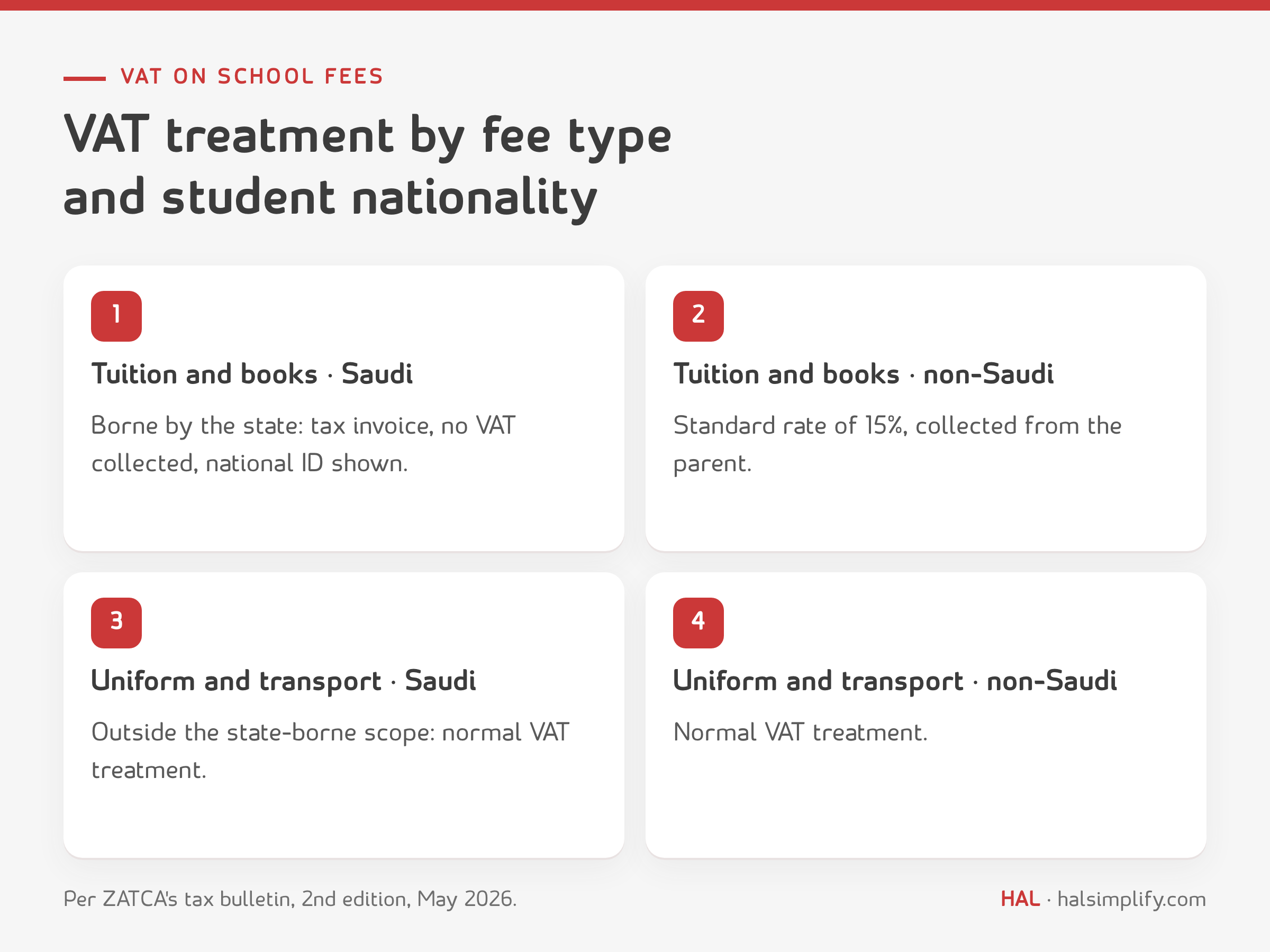
| Item | Saudi student | Non-Saudi student |
|---|---|---|
| Tuition fees | A tax invoice without collecting VAT from the parent, showing the national ID number and contact details | Standard rate, 15% |
| Textbooks sold by the school | Same as tuition | 15% |
| Uniform and transport | Outside the state-borne scope, so the normal VAT treatment applies | Normal treatment |
What this means for the system you choose:
This is not a small accounting detail. If 30 non-Saudi students were recorded as Saudi by mistake, at SAR 24,000 each, that is SAR 108,000 of VAT a year not collected from families that needs correcting. The 15% standard rate has applied since 1 July 2020 (ZATCA guideline on the 15% rate, in Arabic). This is general information, not tax advice; check the latest edition of the bulletin on ZATCA's website.
The figures below are assumptions for illustration, not customer results. Change them to your own in the Excel file in the kit.
Assumptions:
Annual billing:
| Item | Amount (SAR) |
|---|---|
| Tuition: 900 × 24,000 | 21,600,000 |
| 15% VAT on non-Saudi students: 360 × 24,000 × 15% | 1,296,000 |
| Total due from families per year | 22,896,000 |
| Each instalment (one third) | 7,632,000 |
Before: bank transfers and cash, transfers matched by hand, phone reminders when there is time. After: a payment link for every family, automatic reminders before and after the due date, a weekly review of the overdue aging report, and a published re-enrolment policy for balances over 90 days. The "after" collection rates are an assumption about what that discipline can achieve, not a promise.
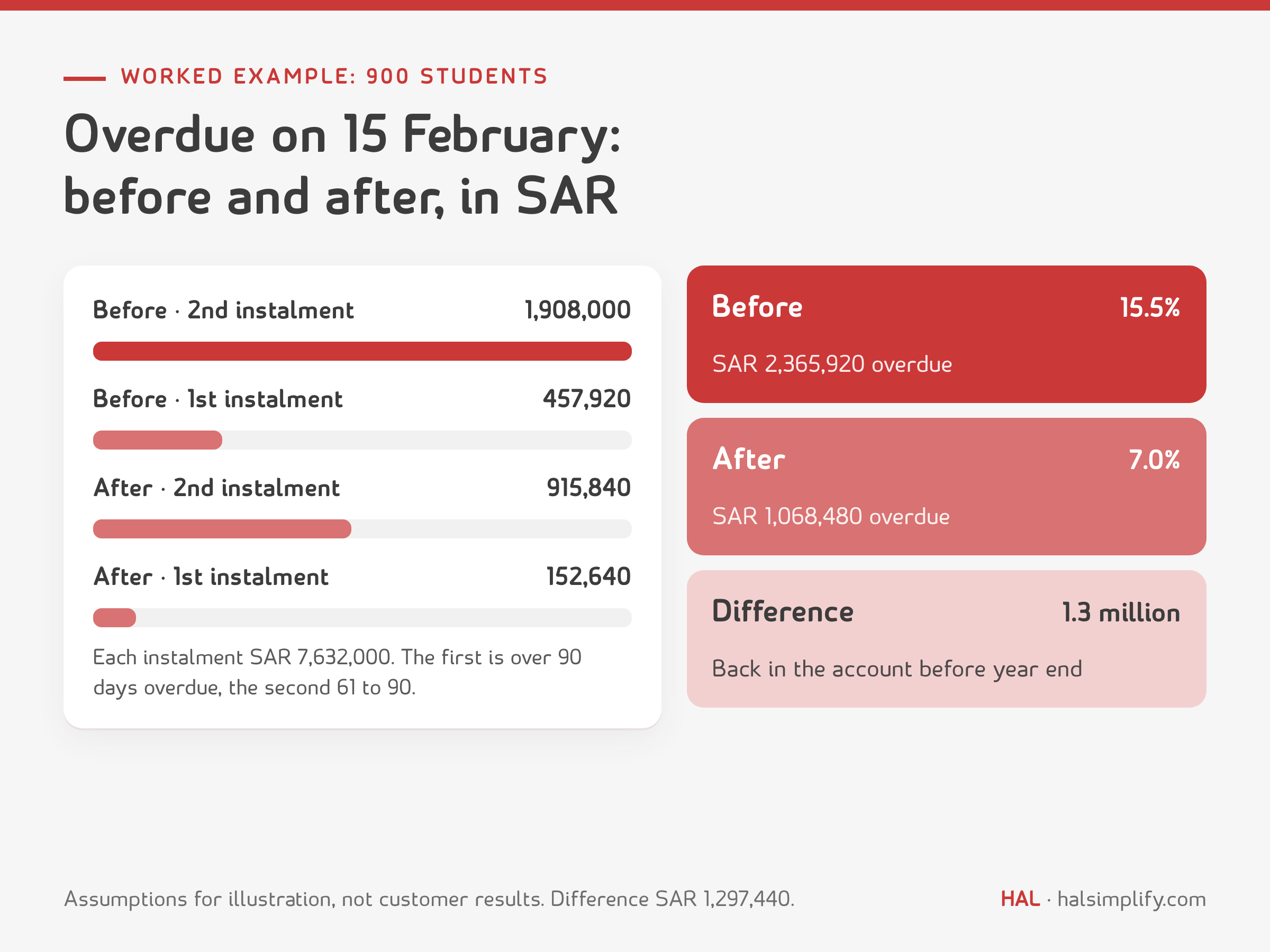
| On 15 February | Before | After |
|---|---|---|
| First instalment unpaid (over 90 days) | 6% = 457,920 | 2% = 152,640 |
| Second instalment unpaid (61 to 90 days) | 25% = 1,908,000 | 12% = 915,840 |
| Total overdue | 2,365,920 | 1,068,480 |
| Overdue as a share of billing to date (15,264,000) | 15.5% | 7.0% |
| Collected from the two instalments | 12,898,080 | 14,195,520 |
The difference, SAR 1,297,440, is back in the school's account before the year ends. Assuming equal fees, that is 225 students with an unpaid second instalment before against 108 after: a list the school can actually phone. Then there is matching time: 900 students × 3 instalments = 2,700 payments a year, and at 10 minutes to match each transfer by hand, that is 450 hours of finance team time.
Want to see this example on a working system with your own figures? Book a demo and ask for it to be built on your fee structure.
After the third demo they all look alike, and memory favours the last one you saw. So score every system on ten criteria with weights you agree before the first demo, not after.

| Criterion | Weight |
|---|---|
| Fees, collections and VAT (instalments, discounts, nationality, e-invoicing, overdue aging) | 20 |
| Admissions, enrolment, student and family record | 10 |
| Parent communication (app in Arabic and English) | 10 |
| Attendance, timetable and cover | 10 |
| Exams and academics | 10 |
| HR and payroll (wage protection, GOSI) | 10 |
| Finance, accounting and purchasing in one ledger | 10 |
| Data migration and implementation plan | 10 |
| Five-year total cost | 5 |
| Arabic support and references from Saudi schools | 5 |
| Total | 100 |
Give each criterion a score from 1 to 5 straight after the demo; the weighted score = weight × score ÷ 5. Each member of the selection committee scores alone, then you add up. If a system scores 1 on a criterion weighted 20, drop it whatever its total. The Excel file in the kit does the arithmetic for three systems.
Do not accept a canned demo. A week before, send the vendor your fee structure and twenty dummy students (no real data) and ask to see these tasks on screen:
Question ten is always forgotten, and it is the one that protects you if the relationship does not work.
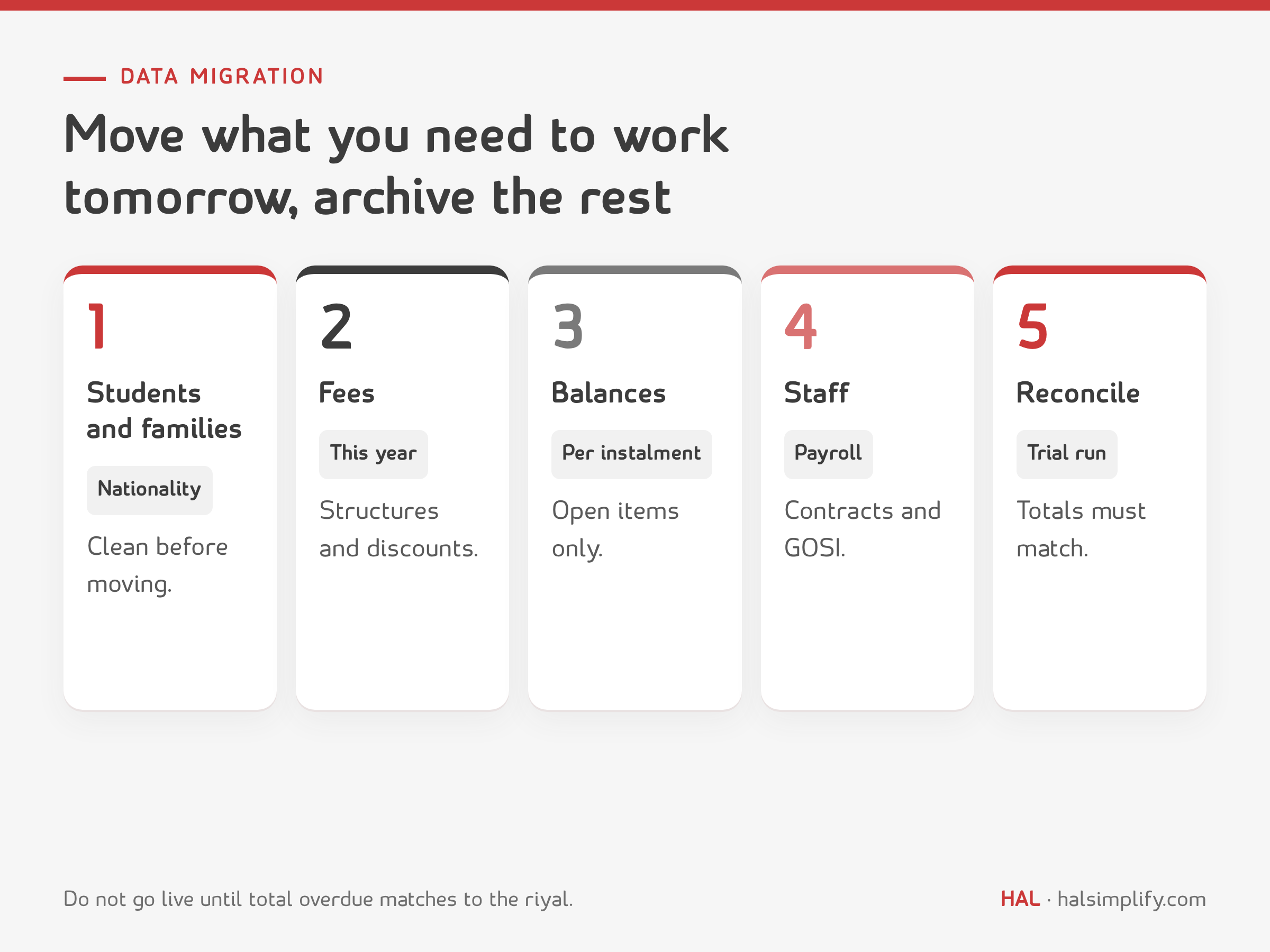
Data migration is what delays go-live most. The rule: move what you need to work tomorrow, and archive the rest.
The best time to switch is the start of a term or a financial year, not the middle of the collection season.
The subscription is only part of the cost. Compare systems over five years, on the same lines:
| Item | One-off or annual | Question for the vendor |
|---|---|---|
| Subscription or licences | Annual | Priced per student, per user or per school? What is the annual increase? |
| Implementation and set-up | One-off | What exactly is included, and how many weeks? |
| Data migration | One-off | Who cleans the data, you or us? |
| Training | One-off, then as staff change | Is training for new staff included? |
| Online payment fees | Per transaction | What is deducted from each card payment or transfer? |
| Customisation and integration | One-off or on request | Do changes survive upgrades? |
| Your internal team's time | Ongoing | How many hours a week will the system need from your staff? |
| Exit | One-off | Is data export free? |
Five-year total = one-off items + (annual items × 5) + an estimate of your team's time. To compare with general ERP pricing, read ERP cost in Saudi Arabia.
You will find three types on the market:
Systems built for universities carry modules a K-12 school does not need and miss the ones it does. For a list of education ERP products and their features, see education ERP software: top 8 tools, then apply the scorecard above to them.
The kit puts everything in this guide in a form you can use:
If your school runs fees in Excel, payroll in another program and parent messages on WhatsApp, this is what HAL Edge was built for. It is a cloud-based school management system that brings together admissions and student records, fees and invoicing with instalments and automatic reminders, exams and grades, parent communication through a mobile app, HR and payroll, and library and transport, on one platform in Arabic and English. HAL Pay lets parents pay fees from their phone, with dues uploaded from Excel and reminders built in.
HAL Edge was built by educationists who ran schools in Saudi Arabia, and every project starts from a functionality map where the school ticks what it needs and notes what is unique to it. HAL estimates basic set-up and training at two to four weeks on average, and full implementation with data migration at eight to twelve weeks; pricing depends on the number of students and the modules required.
There is no single best system for every school. For a private or international school, the best one invoices every student with the right VAT treatment, tracks overdue balances, keeps admissions, attendance, exams and payroll on one record, and passes a demo on your own data against a weighted scorecard the committee agreed before the demos.
Under ZATCA's tax bulletin, the state bears the VAT for Saudi citizens on tuition and textbooks at accredited private and international schools, so the school issues a tax invoice without collecting VAT and shows the national ID number. Non-Saudi students' fees carry the 15% standard rate, and uniform and transport are outside the state-borne scope.
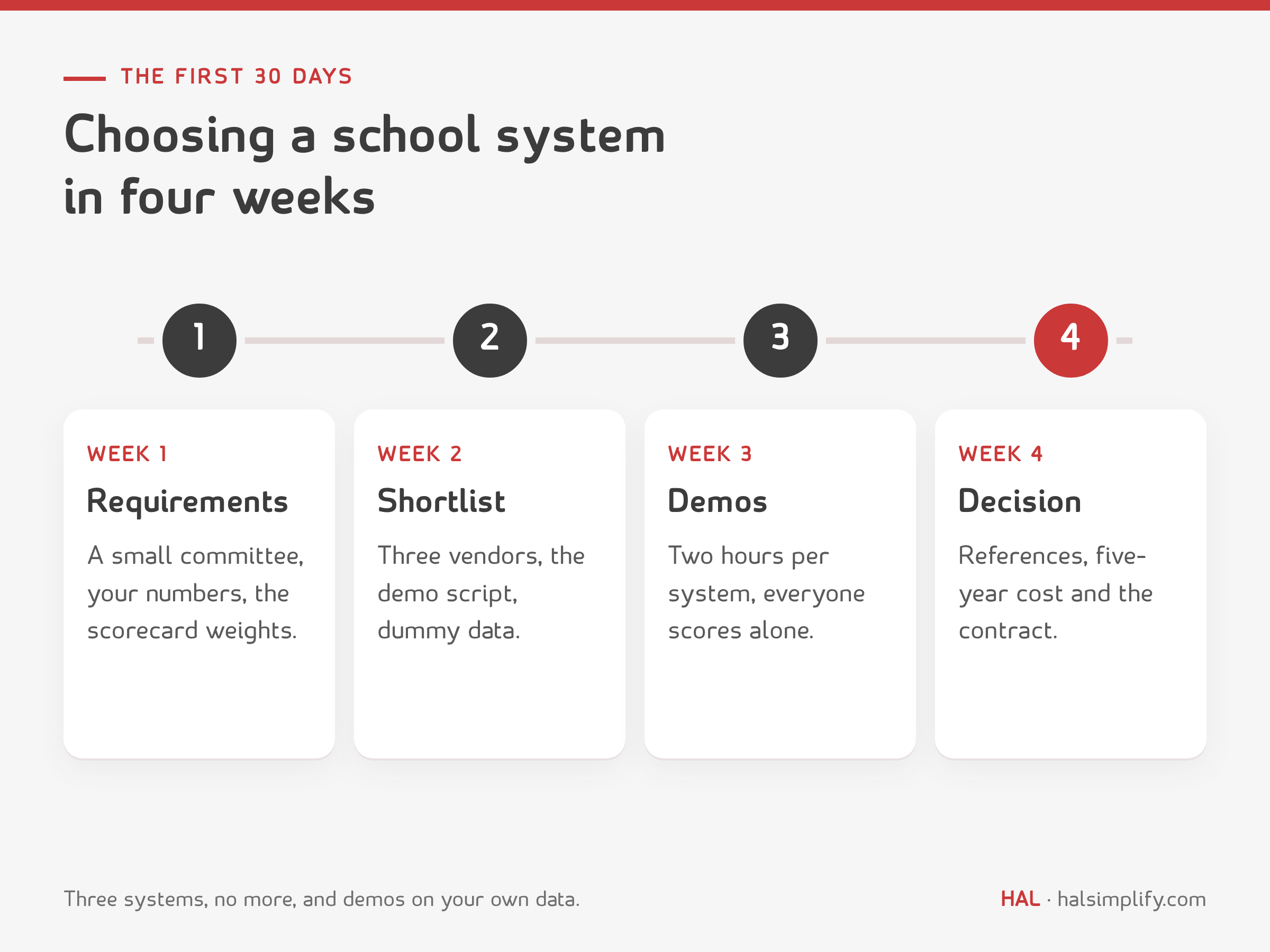
You can choose in 30 days: a week for requirements and numbers, a week for the shortlist, a week for demos on your data, and a week for references, cost and the contract. Implementation is a separate project whose length you agree with the vendor.
Students and families with their nationalities and ID numbers, fee structures and discounts for the current year, open balances per instalment, and staff and payroll data. Do not move the whole transaction history, and reconcile total overdue and student counts between the two systems before going live.
Add the one-off items (implementation, data migration, training, customisation) to the annual items multiplied by five years (subscription, payment fees, support), plus an estimate of your internal team's time.
Yes. The kit is a free download: a PDF guide with the frameworks and printable forms, and an Excel workbook with a weighted scorecard, a fee and overdue register and a five-year cost calculator.