
In short: School staffing and timetable planning starts with periods, not people, and gives you a school staffing plan you can defend. For each subject, add up the periods the school needs in a week and divide by the periods one teacher teaches. That gives the teachers required. Subtract the teachers you have, counted by what they can teach, and the difference is your vacancy, by subject and by compartment. The same load decides the timetable: a sample ladder for an eight-period day gives 2 free periods to a subject or class teacher, 3 to a head of department, 4 to a compartment head or supervisor, 5 to a vice principal, and one class to teach for the principal where possible. Place the result by hand or with school timetable software such as aSc Timetables or FET, and check it against the ladder. Below: why plans fail, the vacancy calculation step by step, the free-period ladder, a software guide, a worked example and a free planner kit (PDF guide and Excel workbook).
It is June. Admissions are up and the school will open two new sections of Grade 6. The principal asks how many teachers to recruit. Someone says "two more", because there are two more sections. In August the timetable is generated, and the Grade 8 Maths teacher finds she teaches seven periods in a row, the vice principal has no free period to cover an absence, and the supervisor who runs the morning rounds is on the timetable for every period after lunch. In October, the school is advertising for a Science teacher it needed in June.
Nobody was careless. The school counted classes, not periods, counted teachers, not what they could teach, and planned the timetable as if the teaching load had no limit. The free staffing and timetable planner kit at the end gives you the calculation, the ladder and the checks.
Five habits, in roughly this order.
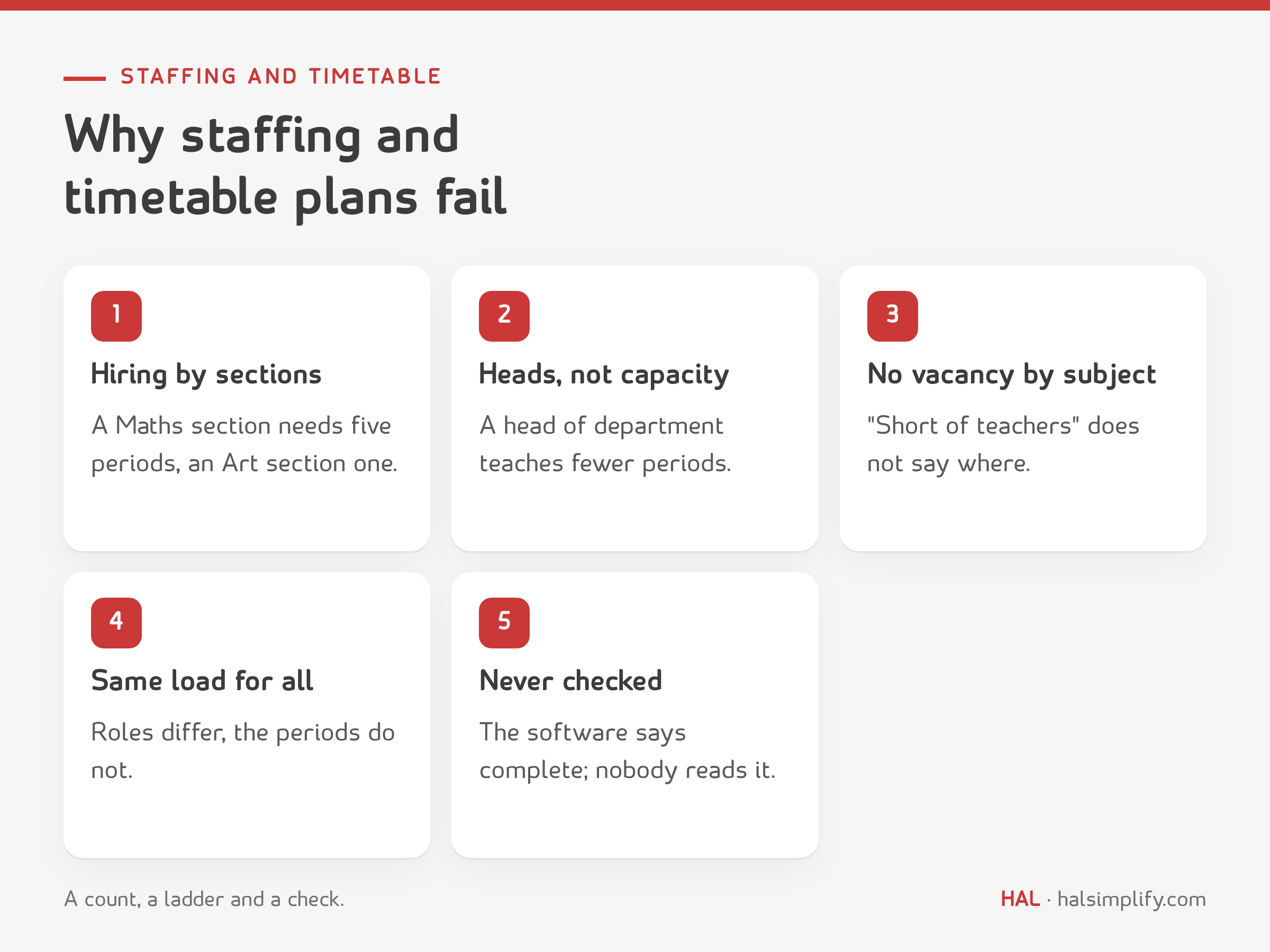
None of this needs expensive software to fix. It needs a count, a ladder and a check.
Divide the school into compartments, such as pre-primary, primary, middle and secondary. For each compartment, write the classes and sections down the side and the subjects across the top. In each cell, enter the periods per week that class gives to that subject. Add each column and you have the total periods per week for each subject in that compartment.
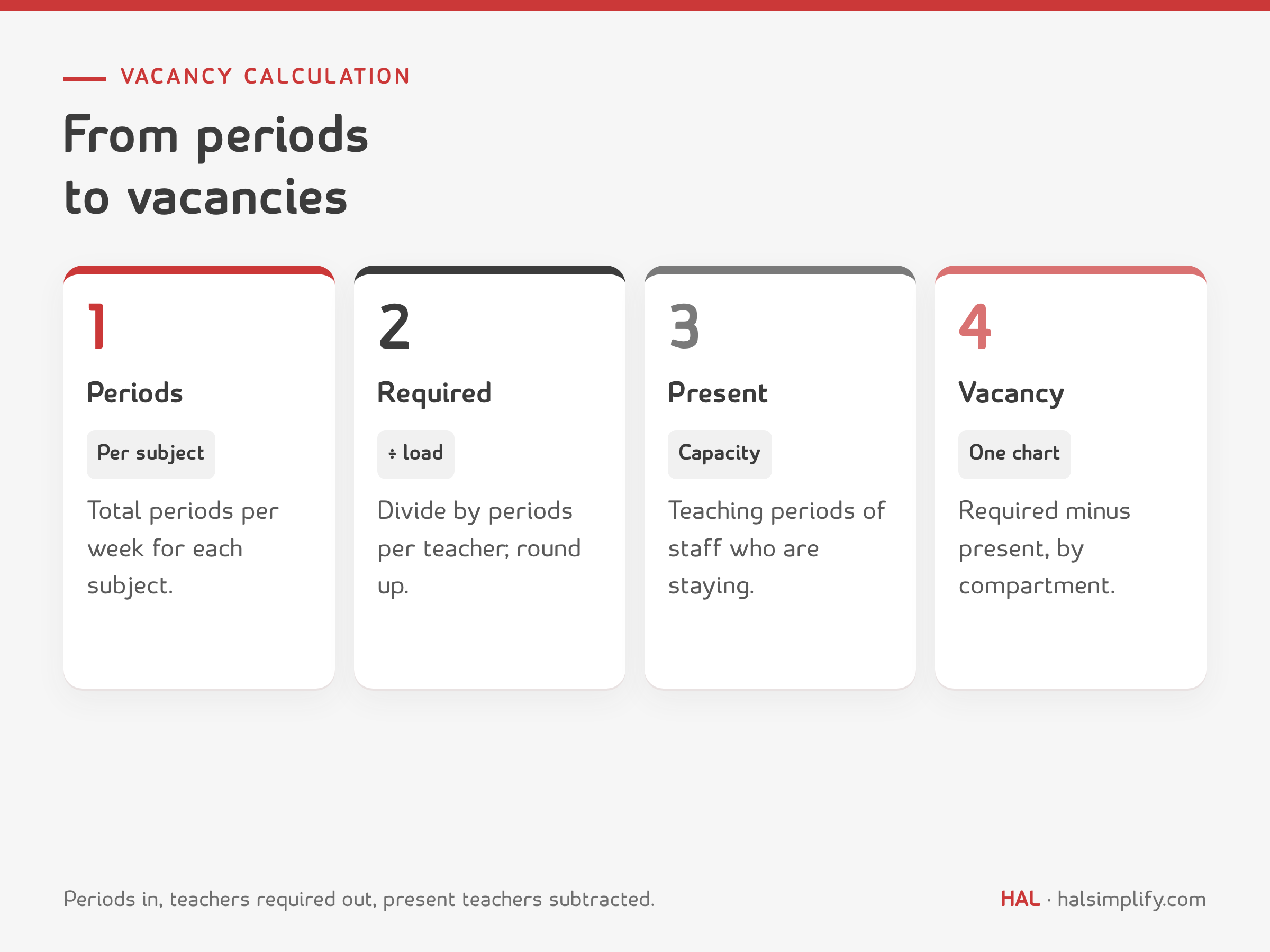
Then divide by the periods one teacher teaches in a week and round up. The result is the number of teachers required for that subject.
Teachers required = total periods per week ÷ periods per teacher, rounded up.
The number you divide by is a choice, and it decides how many teachers you hire. A school with an eight-period day and a five-day week (Sunday to Thursday) has 40 slots per teacher. A teacher who keeps two free periods a day teaches 30 periods a week. One who teaches seven of eight teaches 35.
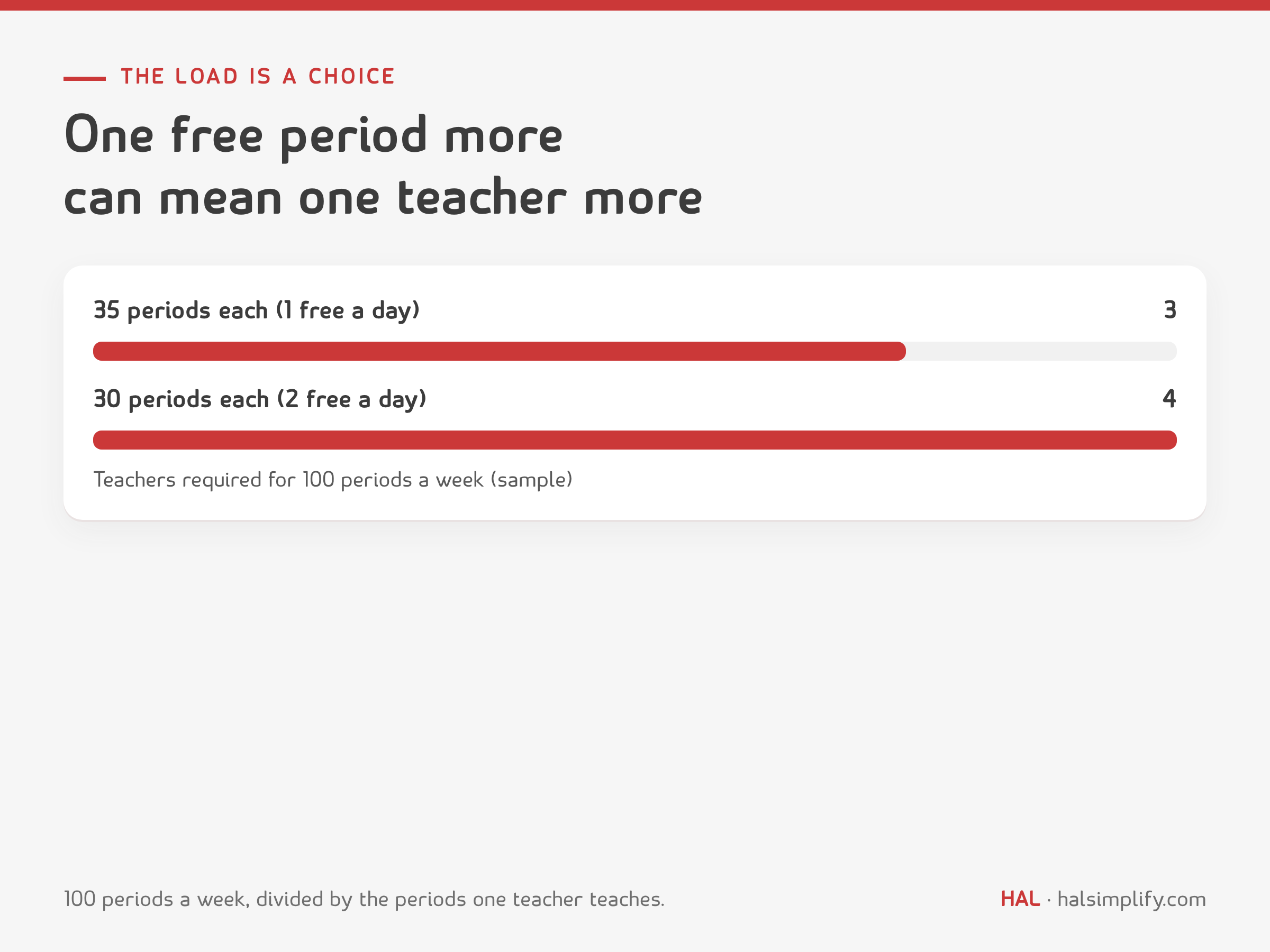
For a subject that needs 100 periods a week, 35 per teacher gives 2.9, so three teachers. Thirty per teacher gives 3.3, so four. The extra teacher is the price of the extra free period. It is better to see that price on paper in May than to find it in September.
Now count what you have, subject by subject. The simplest count is the number of teachers who teach the subject. A better one counts teaching capacity: the periods each person can teach in a week, given their role.
A head of department with three free periods a day can teach five periods a day, or 25 a week. A supervisor with four free periods teaches 20. A teacher who teaches two subjects splits their capacity between them. A teacher who is leaving at the end of the year counts as zero from next year.
When you decide who is present, look at more than the contract list.
The honest question is not "how many teachers do we have?" It is "how many periods of each subject can the teachers we plan to keep teach?"
Vacancy = teachers required − teachers present. Work it out for each subject in each compartment, and a pattern appears: no vacancy in Primary English, two in Secondary Science, one part-time post in Middle Hindi. Put the results in one vacancy chart, compartments down the side and subjects across, with a total on the bottom.
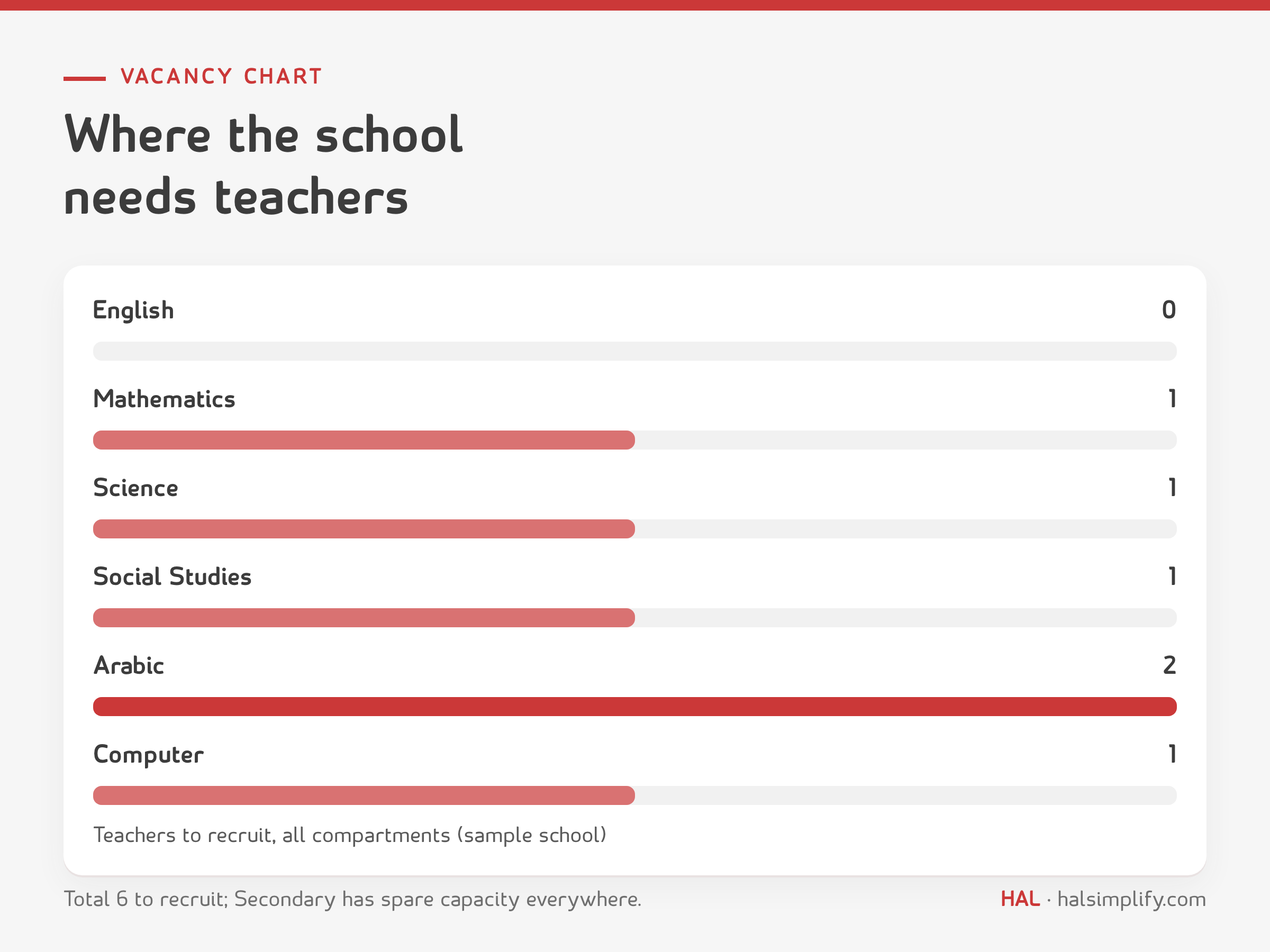
A negative number is as useful as a positive one. It shows a subject where capacity is spare, which may cover a free period elsewhere or a new section.
The chart answers three questions: how many to recruit, in which subjects and compartments, and how many people to keep and support because the school cannot afford to lose them. Next year's sections come from your admission forecast. Plan for sections, not students, and set the number of students per section as your school's own setting.
Not everyone should carry the same load. The more people depend on a role, the more of the day it should keep free of teaching. Here is a sample ladder for an eight-period day.

| Role | Free (non-teaching) periods in an 8-period day | What the gaps are for |
|---|---|---|
| Subject or class teacher | 2 | Correction and marking, lesson notes, one period of cover |
| Head of department | 3 | Reviewing plans and notebooks, supporting the department's teachers |
| Compartment head or supervisor | 4 | Rounds, substitutions, class observations, parent meetings |
| Vice principal | 5 | Academic review, staff support, large decisions and the people who need them |
| Principal | Teaches one class, if possible | Stays close to what a school day is really like |
These are not formulas. They are starting points, and your school can change them. A small school may not have the staff for a ladder this generous, and a school with a long day may want more. What matters is the order: the free time rises with responsibility, and it is written down before the staffing plan and the timetable, because it sets the capacity of every leader. This is the fuller version of the free-period rule in every period covered, where the gaps carry the cover and the rounds.
It is a suggestion, not a rule, and it is easy to dismiss. We think it is worth keeping. A principal who teaches one class meets the timetable from the inside: the clash that nobody mentioned, the period after lunch when no class is ready to learn, the pile of notebooks that arrives on Thursday. They will know the pains their teachers carry, and the next decision about staffing will be made with that knowledge. A principal who does not teach can still lead well, but has to work harder to learn the same things.
With the periods counted and the ladder set, the timetable is the last step, not the first. A teacher with two free periods who has both on Monday morning has none for the rest of the week. Three checks help.
Software can place hundreds of lessons in minutes and obey rules a person would forget. It cannot decide what the rules should be. Give it the ladder above and it will follow it. Give it nothing and it will fill every gap.
Some options we know of are below. Each school's needs and budget differ, so check the current features, languages and price with the vendor before you decide.
| Option | What it is | What to check |
|---|---|---|
| aSc Timetables | Commercial software that builds timetables for classes, teachers and rooms automatically; online and offline versions; several people can work on one timetable. The vendor offers discounts to schools and does not publish a fixed price. | Arabic and right-to-left display, price and licence terms, how it handles role-based limits |
| FET | Free, open-source timetabling software for schools, universities and other institutions, for Windows, macOS and Linux. | Learning time for the constraint screens, Arabic support, who in the school will support it |
| Untis | Commercial timetabling software from Austria, with modules for substitution planning and break supervision. A free trial can be requested. | Price and local support, Arabic support |
| EduPage | An online school platform from the aSc family that includes timetabling. | Whether it suits your school's size and the data you will enter |
Questions to ask any option:
A spreadsheet is a fair place to start. A school with one section of each class can plan the ladder and the grid by hand. Larger schools and schools with many shared teachers will gain from software, but only once the staffing count and the ladder are settled.
Take a made-up school with an eight-period day and a five-day week. The subject is Mathematics in Grades 6 to 10.
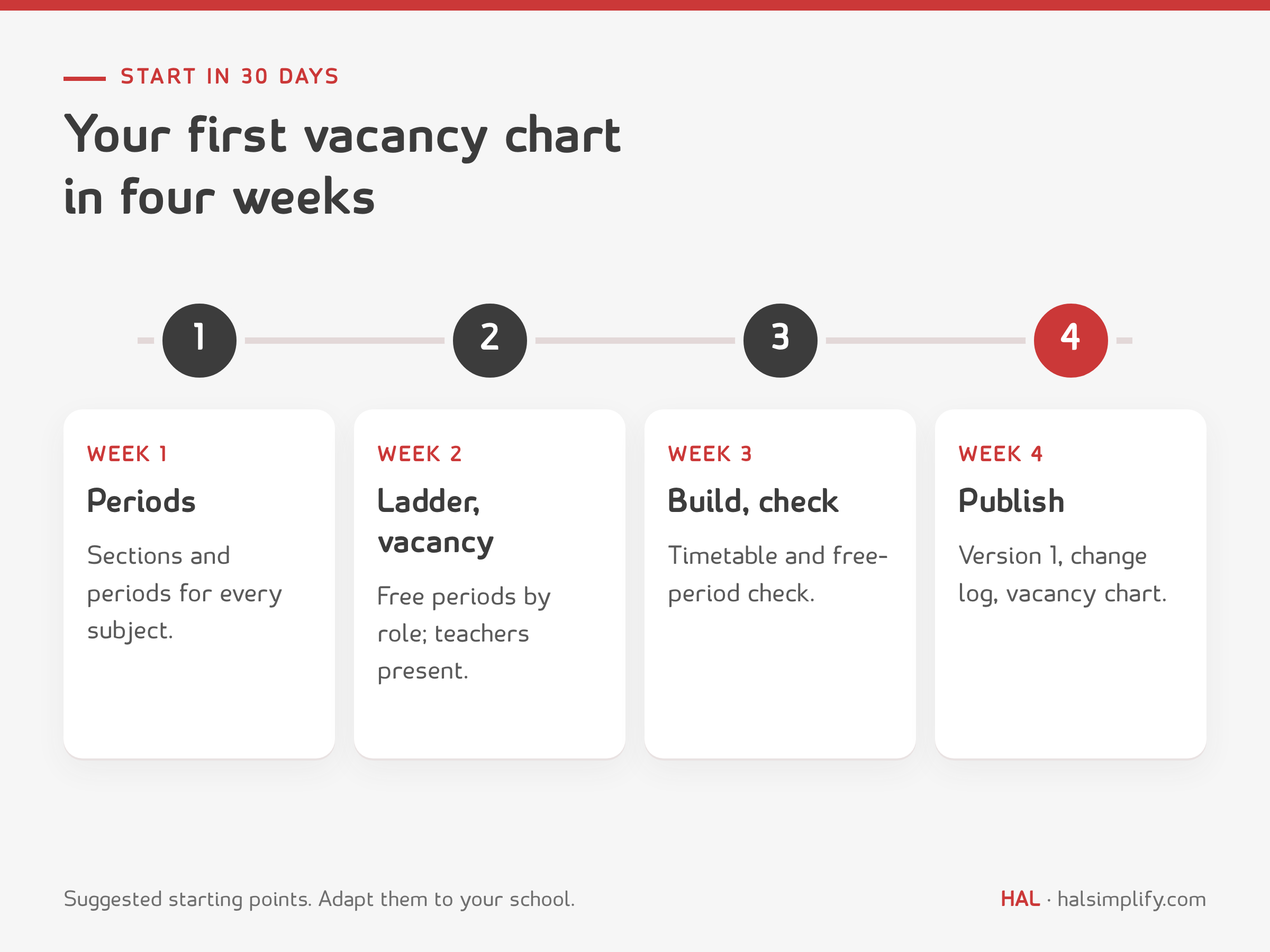
If you are planning for next year:
The kit has two files.
On paper, the periods, the staff list and the timetable are separate files that someone has to compare. In a system where they live together, a vacancy or an overload can be seen as it happens.
HAL Edge, HAL's education management system, keeps academic routines, faculty performance and school data together, in Arabic and English.
Add up the periods each subject needs in a week, divide by the periods one teacher teaches in a week and round up. Do it for each subject and each compartment. The teaching load you choose, which depends on the free periods you allow, changes the answer.
Vacancy is the teachers required minus the teachers present, by subject and compartment. Count the teachers present by teaching capacity, not just by head, and allow for leavers.
There is no universal number. A sample ladder for an eight-period day is two for a subject or class teacher, three for a head of department, four for a compartment head or supervisor and five for a vice principal. Your school can adjust each one.
It depends on size, budget and language. aSc Timetables is commercial software with online and offline versions, FET is free and open source, and Untis and EduPage are other options. Check current features, Arabic support and price with each vendor.
We suggest one class where possible. A principal who teaches meets the timetable and the workload from the inside. It is a suggestion, and each school decides.
Yes. A spreadsheet with sections down the side and subjects across the top is enough to count periods, teachers required and vacancies. Software helps most with the timetable itself.
Yes. The kit is a free download: a PDF guide and an Excel workbook that counts teachers required and vacancies and checks free periods against your own ladder.
Get the next routine in your inbox
One practical school routine a week, each with its free PDF guide and Excel tracker. Unsubscribe any time.